
What is a Primary Dashboard and Why Does it Matter?
The Concept of Primary and Embedded Dashboards

I’ve recently spent time with a client optimizing and cleaning up a dashboard implementation. As part of this I have noticed a recurring issue around Primary (or Main) Dashboards that could use clarification.
The term Dashboard is used interchangeably for a single dashboard or a Dashboard Group that contains many Dashboards, with most of them embedded in other Dashboards, to one degree or another. In fact, when you create a single Dashboard, OneStream creates an embedded Dashboard component based on the dashboard that you just created.

It is this embedded dashboard component that you add to other dashboards in the Dashboard Components tab of other Dashboards as you build out your Dashboard Group.

There is the concept of the Main Dashboard, or the Frame Dashboard that contains all the other embedded dashboards. It is this Main Dashboard that you tend to run, which then renders all the other embedded dashboards as one cohesive whole.
Technically that Main or Frame Dashboard is the Primary Dashboard. Embedded Dashboards are never the Primary Dashboard.
Importance of the Action Property in Primary Dashboards
Why is this important? The Action Property on the Dashboard Property Tab is why it’s important.
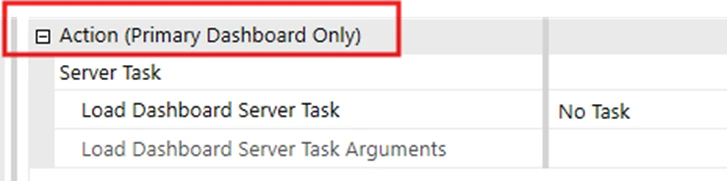
Note that the property group is labelled “Action (Primary Dashboard Only)”. This property will run a business rule if it’s configured properly and if it is added to the Primary Dashboard. I have seen too many cases where this has been configured on a dashboard that is not a Primary Dashboard and as a result the called Dashboard Extender function will never run.

Why would it be set up on a non-primary Dashboard? My assumption is that whoever did this just did not realize that it does nothing on a non-primary Dashboard.
Demonstrating the Primary Dashboard Functionality
To prove this out and for demonstration purposes I have created a Dashboard Group that is made up of 3 dashboards, 2 embedded in the first (Primary Dashboard).
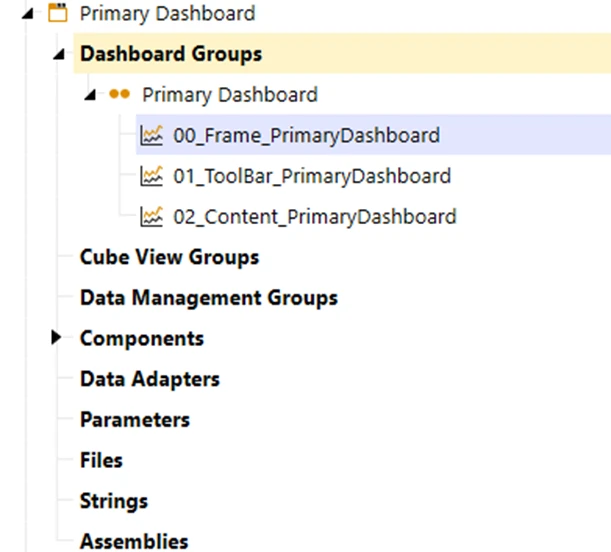
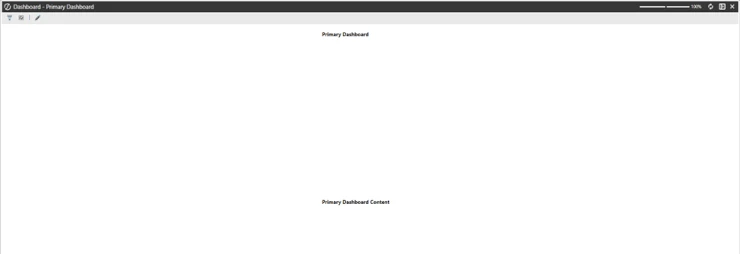
When the 00_Frame_PrimaryDashboard is run, it looks like the screen shot below.
I then configured the Primary Dashboard (00_Frame_PrimaryDashboard) to run a Dashboard Extender.

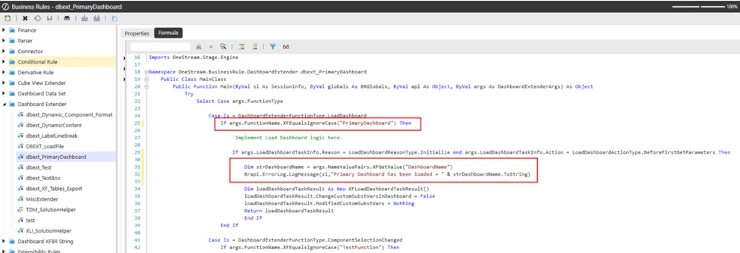
The Dashboard Extender has a function added to the Load Dashboard Case section of the Dashboard Extender. This function writes the name value pair value to the Error Log when the Dashboard is loaded and if it is the primary dashboard.
Common Mistakes with Dashboard Extender Configuration
This is what you see in the Error Log, as expected, when the Primary Dashboard is loaded.

To prove that this dashboard extender will not run if called from an embedded dashboard I set up the Action Server Task properties on one of the embedded Dashboard to run the same Dashboard Extender, but I passed in a different value in the name value pairs. Then I loaded the Primary (Main) dashboard again.

As expected, there was nothing written to the Error log on the load of this embedded dashboard.
To prove that the syntax of the Dashboard Function call is correct, if I run just the dashboard 02_Content_PrimaryDashboard and check the error log I will see the name value pair that I passed in from this dashboard in the error log.

It works this time because the dashboard was not run from its embedded state, but as a Primary Dashboard.
I hope that this clears up when to and when not to add a Dashboard Extender Function call to the Load Dashboard Server Task property on a Dashboard.
Contact MindStream Analytics

Want to learn more about OneStream Software? The consultants at MindStream Analytics are here to help you take your consolidations and reporting to the next level.
Featured Webinar

Unlock the power of OneStream Quickviews and elevate your financial planning and analysis (FP&A) process with this insightful webinar hosted by Erick Lewis of MindStream Analytics.
Partner SpotLight
OneStream CPM
OneStream aligns to your business needs and changes more quickly and easily than any other product by offering one platform and one model for all financial CPM solutions. OneStream employs Guided Workflows, validations and flexible mapping to deliver data quality confidence for all collections and analysis while reducing risk throughout the entire auditable financial process.