
How to Rename a File in OneStream Application Database File Explorer Using BRApi
OneStream Blog
Changing the name of a File in File Explorer

I recently ran into a case where I needed to change the names of some files in File Explorer. I had another Business Rule running from a Data Management job that was creating the files and exporting them to the file share then moving them to the Application Database File Explorer so that Users could access them. I needed to then modify the name in some cases based on a couple of different business cases. I have moved and deleted files through code before so I assumed that this would be straightforward and build on what I already knew and had coded before. That didn’t turn out to be the case.
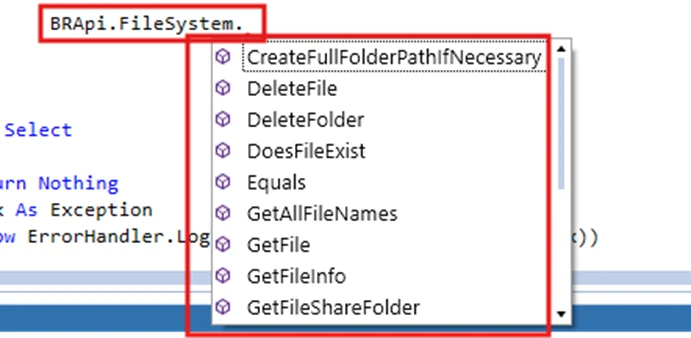
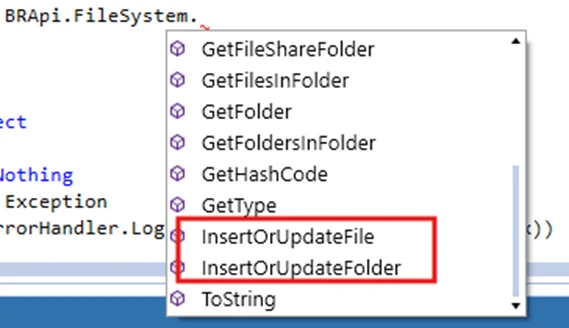
There are several BRApi.System functions related to file manipulation, however when I looked through them, I saw ones called DeleteFile, GetFile, InsertOrUpdateFile, nothing named ChangeName or Name. There was nothing that intuitively pointed me in the direction I wanted of changing the name of a file. In the end it did turn out to be straightforward, it just took a different approach and way of thinking about BRApi.FileSystem.InsertOrUpdateFile.
In the next screen shot I have a file, TotalCompany_CubeData_OldName.CSV that I want to change the name of to TotalCompany_CubeData_NewName.CSV
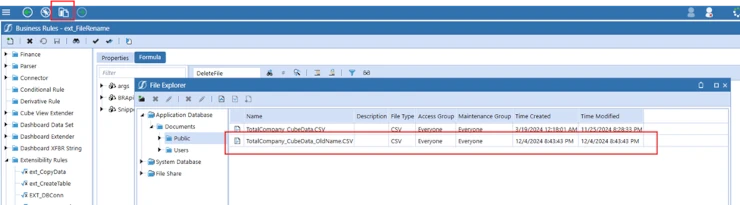
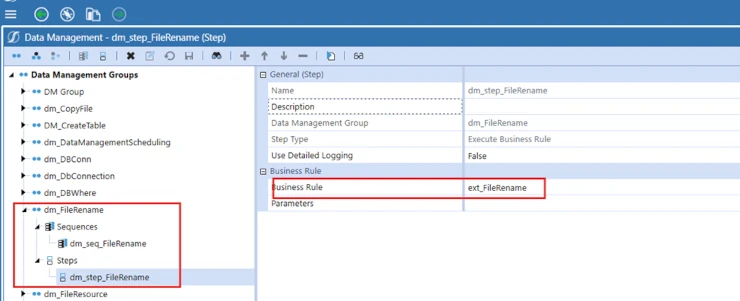
Step 1. I created an Extensibility Rule that I could run from a Data Management Step.

Step 2. Using a XFFileEX Object and BRApi.FileSystem.GetFile, get the file to be renamed. Specifying that it is in the Application Database and passing the full path and name of the file.

Step 3. Then I created the code that will “rename” the file. Essentially what will happen is that in Step 2 I get the file to be renamed, then I will use BRApi.FileSystem.InsertOrUpdateFile to insert the file with the new name. BRApi.FileSystem.InsertOrUpdateFile takes a XFFile object. The XFFile object contains XFFileInfo object that contains the new name and the XFFileEx that contains the old file contents. So you pass the old file and its new name into BRApi.FileSystem.InsertOrUpdateFile.


The code in its entirety.

The different way of thinking about this for me was with BRApi.FileSystem.InsertOrUpdateFile. I had used it previously to get files from the file share and move them to the application database file system. In that case I was getting the file to move, with its name and then copying it to the new location using BRApi.FileSystem.InsertOrUpdateFile, however with the same name. Once I realized that with the XFFileInfo object that instead of using the original file name (as I was doing when I was moving files) that I could give it a new file name everything else fell into place. Now when I run this extensibility rule the file is copied, inserted with a new name and the original file is deleted.

Contact MindStream Analytics

To learn more about OneStream and how MindStream Analytics can help you improve your planning, reporting, and analytics, please fill out the form below.
Featured Webinar

Unlock the future of financial management with our informative webinar and demo of SheetsTM for OneStream, a pioneering solution by MindStream Software that brings OneStream’s powerful financial features directly into Google SheetsTM.
Transform your Financial Management in Google Sheets with Sheets for OneStream
Partner SpotLight

OneStream CPM
OneStream aligns to your business needs and changes more quickly and easily than any other product by offering one platform and one model for all financial CPM solutions. OneStream employs Guided Workflows, validations and flexible mapping to deliver data quality confidence for all collections and analysis while reducing risk throughout the entire auditable financial process.