How to look up data from an Application Database and return it to your business rule in the form of a Data Table.
There are cases when I want to look up data from an application database and return it to a business rule for further use. I may want to look up a single field value, I may want to return multiple rows or fields or I might want to do manipulation of the data through SQL code. In this case, especially if I want to do any sort of transformation of the data using SQL, I use the BRApi.Database.ExecuteSqlUsingReader API function.
This function allows me to pass in a SQL Query. If you can pass in a SQL Query then the sky is the limit as to the transformations you can do. Want to link multiple tables? Do Unions? Recursive Joins? You name it, you can do it here. I have even joined application database tables with other custom databases within OneStream and returned those results.
For explanation purposes I have kept the sql in this example to a single line of code that returns a single result. However, you can place any sql you want into the section where you define your sql statement to be passed. I have found no limitations to what I can place in this section.
For example purposes I have a table within the application database called XFC_Member_Rename which contains 3 fields, I am going to pass it a value in the OldMemberName field and return a Value from the NewMemberName field.
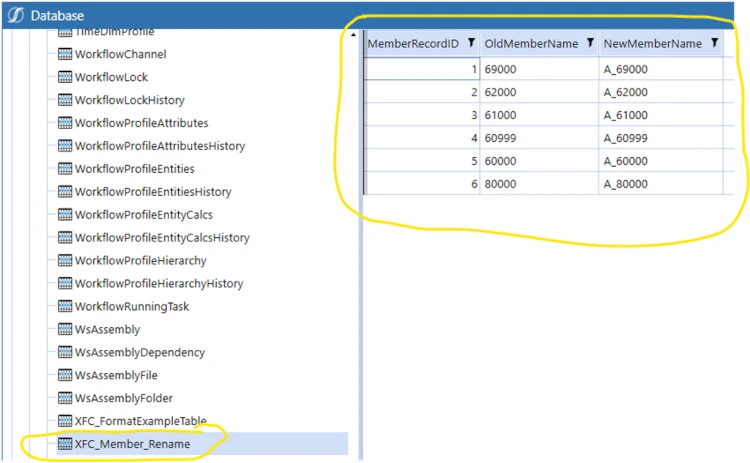
In the next steps I have created this code in an Extensibility rule and I call that with a Data Management Step, for demonstration purposes.
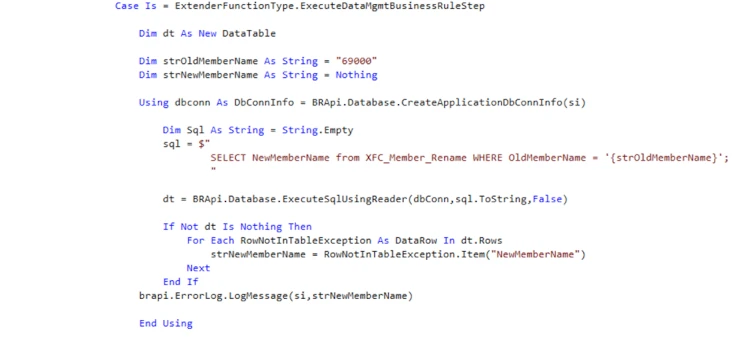
- 1. Create the Data Table object which will hold the returned data plus the string that the SQL query will use in its where clause (to show you can pass parameters into your sql query) and the string to hold the returned value.

- 2. Create a DBConnInfo object which specifies, in this case, to connect to the Application Database.

Note that you can connect to more than the Application Database.
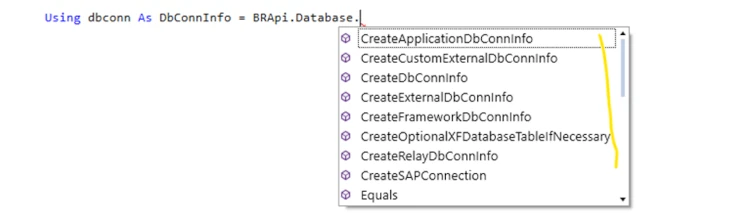
- 3. Then create a string object to hold your sql query

- 4. Now using BRApi.Database.ExecuteSqlUsingReader pass in your sql string and the dbConn object, assigning the return data to your previously defined data table. This function will query the application database using your sql and returns the results to a data table.

- 5. Now that the data is in a data table you can access it in code. The example below gets the value from the NewMemberName field that is returned, assigns the value to strNewMemberName and then writes it to the Error log for demo purposes.

Here is the function in its entirety
I have found the BRapi.Database.ExecuteSqlUsingReader function to be a very powerful function and have used it extensively to query Application Tables (and others) using the SQL Query to do extensive transformations of the data.
Contact
MindStream Analytics
To learn more about OneStream and how MindStream Analytics can help you improve your planning, reporting, and analytics, please fill out the form below.