
Blog
How to look up and return a single value from a field in an Application Database Table
How to look up and return a single value from a field in an Application Database Table, the use case for BRApi.Database.LookupRowFieldValue using a DBWhere object
There are cases when you need to look up a value from an Application Database table and return the value to your Business Rule. You could create a database connection, write a sql query, pass the sequel query through a business rule, capture the returned value in a data table then get that value and pass it to a variable.
However, there is a another way, BRApi.Database.LookupRowFieldValue using a DBWhere object. There are cases to be made for both approaches. I personally use the BRApi.Database.LookupRowFieldValue approach when I want to look up a single value as its only 4 lines of code. This is just one way of doing things, not the only way.
The BRApi.Database.LookupRowFieldValue function takes 6 parameters, si as SessionInfo, dblocation As String, tableName as String, dbWheres as List(Of DbWhere), fieldToReturn as String, defaultValue as String.

Here is a look at the table I will be retrieving a value from. The example will be retrieving the NewMemberName where the OldMemberName is equal to “69000”.

-
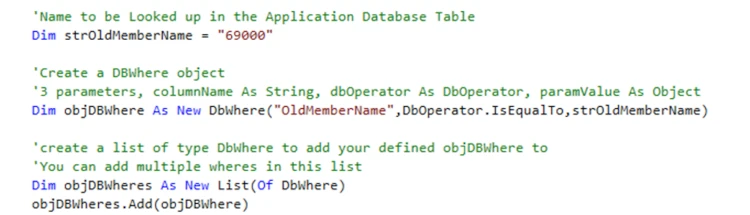
1. Create your dbWheres object which is a list of DbWhere objects. I think of the DbWhere objects as the equivalent of the where statement in a SQL query, they serve the same purpose.
In the example below I first create my DbWhere. You can create multiple DbWhere objects and add them to the objDBWheres object which is a list of DbWhere objects. The DbWhere takes 3 parameters, the field name that the where will act on, the type of action (in this case IsEqualTo) and the criteria to act on. This example shows a where clause on the OldMemberName field where it is equal to “69000”.
The DbOperator as many different actions that you can select, some of which you can see in the screenshot below.

Now that you have the objDBWheres (which is a list of DbWhere objects) you use this in the BRApi.Database.LookupRowFieldValue api call.
-
2. Add your BRApi.Database.LookupRowFieldValue function call.
LookUpRowFieldValue takes 6 parameters, including your DbWheres object. You pass it the dbLocation, in this case that is the application database, the table name to lookup on, your objDBWheres and the Field to return a value from. You can also specify a default value to return if nothing is found.

Here is the complete code, including in this case a write to the error log for demo purposes.

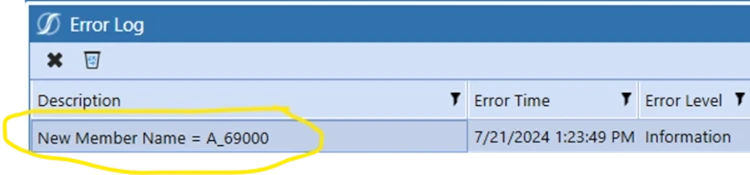
For demonstration purposes I have this in an extensibility rule which I can call from a Data Management Step. When I run it it shows the returned value in the error log.

Contact MindStream Analytics

To learn more about OneStream and how MindStream Analytics can help you improve your planning, reporting, and analytics, please fill out the form below.
Featured Webinar

Join us for a compelling webinar as we delve into the revolutionary capabilities of OneStream Software for corporate performance management (CPM).
OneStream: The Power of One Platform for Intelligence Finance


Partner SpotLight

OneStream CPM
OneStream aligns to your business needs and changes more quickly and easily than any other product by offering one platform and one model for all financial CPM solutions. OneStream employs Guided Workflows, validations and flexible mapping to deliver data quality confidence for all collections and analysis while reducing risk throughout the entire auditable financial process.