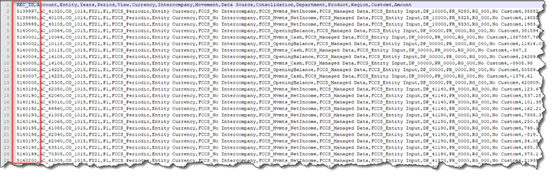
Add a Unique REC_ID to Each Exported Record
Compatibility note: This example targets the table-based Data Management workflow. Oracle’s Quick Mode does not support mapping expressions that query TDATASEG_T; confirm the integration mode and validate the output in a test environment before applying this approach.
Recently, an FCCS client had a need to include a unique identifier to each record of data extracted from their FCCS application. This Record ID was required by a downstream application for indexing purposes.
The record ID did not have to start with a particular value, but it did need to be unique for every row of data exported within the file. This particular client was using FCCS, but did not have an instance of EPM Automate available.
They were instead utilizing REST API calls made from third party tools for automation. We were not able to use any of those third-party tools to edit the file once it had been generated, so we could not add the index after the file had been created. FCCS has limited built in functionality for extracting financial data to text files.
Most clients will turn to Data Management (DM) as the method to export data from FCCS into a flat or text file for consumption by downstream applications.
DM has its own limitations, especially when compared to an on premise FDMEE implementation. The lack of VB or Jython scripting in DM means that there are limited options available to control data or objects while processing data.
Luckily, DM still provides the use of SQL mapping. SQL mapping is a means to inject SQL syntax during data transformation, ostensibly for expansion of conditional mappings.
When assigned to a dimension’s mapping process, it can be a powerful tool which allows a developer to query and affect data in the relational tables behind the scenes.
Environment Overview
FCCS is a cube-based application, without advanced or customizable data extract capabilities. When exporting data from FCCS to text file, the best practice is to use Data Management (DM).
DM is also the tool to import data from various sources (text file, direct connect, odbc, etc.). While not a full-fledged ETL tool, DM does provide mapping, filtering and scheduling tools for FCCS data import/export.
DM is built upon a relational database. Since the database resides in Oracle cloud, it is not possible to access or affect the data using client-based tools such as SQL Server Management or SQL Plus.
The tables, views and stored procedures are not exposed to the user. However, some information about the schema and tables are documented.
The relevant information for this process is that when importing data to DM, the data is temporarily stored in the table named TDATASEG_T. This table is cleared before and after each run of import or export.
All data manipulation (mapping, sign flips, etc.) is performed in TDATASEG_T before being written to the master data table TDATASEG. TDATASEG is the table that ultimately stores and displays data in the DM workbench.

TDATASEG_T and TDATASEG have the exact same design properties (fields and indexes).
TDATASEG and TDATASEG_T contain fields for all relevant metadata (account, entity, etc..) before and after the data manipulation occurs. There is also a field called DATAKEY which is a primary key field in the table. DATAKEY is a number field, which contains a system generated unique key for each row of data.
Retrieving the value stored in the DATAKEY field of TDATASEG_T during the mapping process will provide the necessary unique identifier for the records exported to the flat file.
In order to present the contents of the DATAKEY field in the export, it is necessary to create a “dummy” metadata dimension in DM for storing the value. The process would be to load information from FCCS into the dummy dimension.
This data can be anything, it does not matter where the information came from or what its value is, because we will overwrite it with the DATAKEY value stored in TDATASEG_T. In this case we will be loading the Custom4 dimension members into the dummy dimension.
Custom4 is already being used, but a single source dimension can be used to load to multiple target dimensions.
DM Object Requirements
Target Application
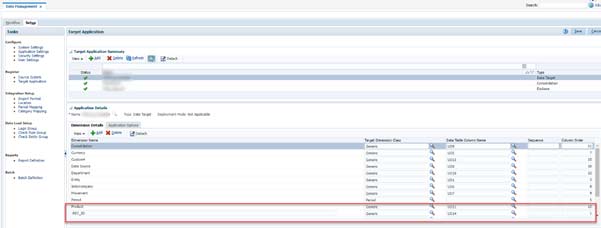
In the Target Application Details, a new Dimension field will be added called REC_ID (Record ID). This Dimension will be set with a class of “Generic”, and point to the next available Data Table Column Name (in this case, the next available column name is UD14).
Note that since the REC_ID is supposed to be the first field in the exported text file, the Column Order fields must be set so that REC_ID is “1”, and all other existing fields must be incremented by +1 (Consolidation used to be 10, needs to be changed to 11. Currency was 6, needs to be changed to 7, etc.)
Import Format
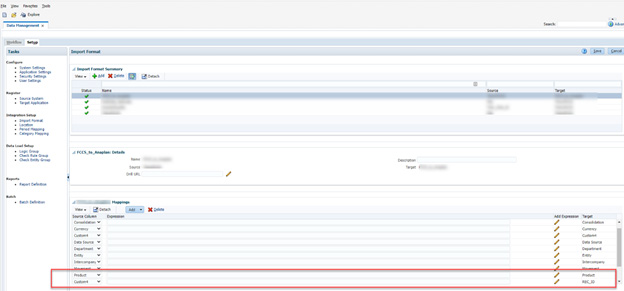
It has already been determined that the migration will use the source dimension Custom4 for loading into the REC_ID field. It really is not relevant which dimension is used – all data from the source, no matter what its value, will be overwritten during the mapping with the DATAKEY value.
Custom4 was chosen because it is currently not being populated or used in this implementation of FCCS (all data in FCCS is at “No Custom4”). But you can really use any dimension you like.
Mapping
All dimensions will be one-to-one mapped using wildcards ( * to *), with the exception of the REC_ID field. In this case, any value in the source Custom4 dimension will be mapped using a SQL script.
The SQL script will be invoked as part of the “Like” mappings.
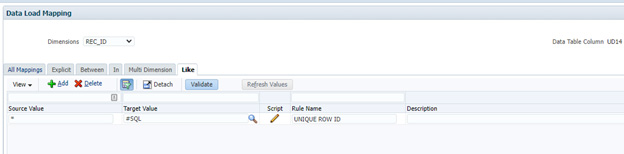
The syntax of the SQL map is designed such that we will retrieve the current record’s DATAKEY value. Once retrieved, that will be the value written to the REC_ID field.
Note that is not currently possible to simply reference the DATAKEY field in the mapping
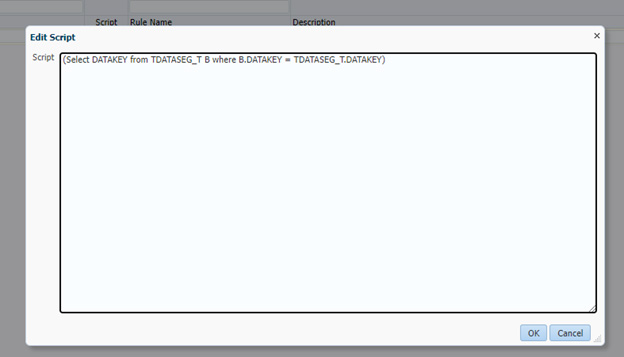
The SQL is
(Select DATAKEY from TDATASEG_T B where B.DATAKEY = TDATASEG_T.DATAKEY) This mapping will execute during the process of importing the data from FCCS into DM. After mapping, the contents of the REC_ID field will change from the contents of Custom4 (“No Custom4”) to the current record’s DATAKEY value

Validate the Final REC_ID Export
Once the process is complete, the data file will include the REC_ID field as the first column in the text file.