onestream

OneStream Confirmation Rules

OneStream Confirmation Rules – Ensuring Data Quality

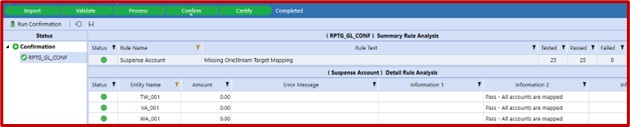
When it comes to managing business operations, effective communication is key. OneStream’s Confirmation Rules feature is a powerful addition that can provide data quality checks to incoming data. Theserules promote accountability and transparency. Common rule types Trial Balance Load is Balanced (Assets = Liabilities + Equity) Specific accounts (i.e., Suspense account) have a balance that […]
Read more
Easily deliver reporting packages to your Users Part 2 image 1

Easily deliver reporting packages to your Users Part 2

Easily deliver reporting packages to your Users Part 2 As noted in the previous blog, OneStream books are an excellent way to deliver reporting packages to your users. Also, in our previous blog, we looked at the basics of creating a book, including organizing books into folders, and created a book that ran several reports […]
Read more
Featured image for The Importance of a Source Dimension in Oracle PBCS

The Importance of a Source Dimension in Oracle PBCS

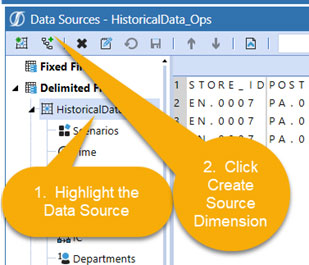
The Importance of a Source Dimension in Oracle PBCS Dimensions are the components that label, store, and arrange data. Each dimension contains a hierarchy of related members grouped in a parent/child structure. In Oracle Planning and Budgeting Cloud (PBCS), there are seven dimensions out of the box which are Account, Currency, Entity, Period, Scenario, Version, […]
Read more
Beginning Retained Earnings in OneStream consolidation

Balance Sheet Accounts: Powerful OneStream Hierarchy

Balance Sheet Accounts: Powerful OneStream Hierarchy If you need to put balance sheet and income statement accounts into the same hierarchy and then report on the movements across periods, have you tried this? Balance sheet accounts and income statement accounts behave differently across periods. Point-in-time balances carry forward, while activity accounts normally reset according to […]
Read more
onestream data source screen

OneStream Concatenating two source fields

Concatenating two source fields When loading source data into OneStream, you may have a requirement where the mapping of a dimension is based on the content of two separate fields in the source. For example, you may have a target Product dimension that is populated based on the combination of the values stored in the […]
Read more
Featured image for Transforming Corporate Finance: Beyond the Basics of Connected Planning

Transforming Corporate Finance: Beyond the Basics of Connected Planning

Transforming Corporate Finance: Beyond the Basics of Connected Planning Introduction to Enhanced Corporate Finance Solutions The evolution of corporate finance has introduced concepts like ‘connected financial close,’ ‘connected planning,’ and ‘connected reporting.’ These terms reflect the integration of essential financial processes such as financial close and consolidation, account reconciliation, financial reporting, and extended planning and […]
Read more
Attribute Dimensions

OneStream Attribute Dimensions – Usages

OneStream Attribute Dimensions – Usages The OneStream Attribute Dimensions provide the ability to introduce additional dimensionality to an OneStream application. Typically, OneStream Cube Dimensions are created based upon the reporting requirements for a client, data is then integrated into those dimensions, transformed, and loaded to the Cube to be reported on. When utilizing OneStream attribute […]
Read more
Composite Mapping

Some Usages of OneStream Composite Transformation Rules

Some Usages of OneStream Composite Transformation Rules The OneStream Transformation Rules provide the ability to transform or “Map” source data to the desired target OneStream reporting intersection. OneStream transformations are comprised of 5 different types of Mappings: a) One-to-One b) Composite c) Range d) List e) Mask This article will focus on the Composite type […]
Read more