Balance Sheet Accounts: Powerful OneStream Hierarchy
If you need to put balance sheet and income statement accounts into the same hierarchy and then report on the movements across periods, have you tried this?
Balance sheet accounts and income statement accounts behave differently across periods. Point-in-time balances carry forward, while activity accounts normally reset according to the reporting model. When both types contribute to FFO, AFFO, cash-flow, or management-reporting calculations, the hierarchy and Flow dimension must preserve those accounting behaviors.
This OneStream approach keeps the statutory account structure intact while calculating period movement through dedicated Flow members. It allows balance sheet accounts to return only the change between the prior ending balance and the current ending balance, while income statement activity continues to aggregate naturally.
How to Combine Balance Sheet Accounts in OneStream
Client calculates FFO (Funds from Operations) and AFFO (Adjusted Funds from Operations) by adding the movements of various trial balance accounts, meaning both balance sheet and income statement accounts.

Historical Consolidation & Reporting
Legacy consolidation is done in PBCS which does not handle data based on financial reporting account types the way that a consolidation system such as OneStream does.
Reporting is done via Excel.
OneStream
- Consolidation tools like OneStream XF include financial intelligence such that account types are assigned based on the nature of seeing balances based on traditional financial statement presentation line items.
- Balance Sheet accounts are point-in-time account types whose balances do not naturally flow from period to period.
- Income Statement accounts are typically viewed as movements that accumulate to a year-to-date value.
How to Enable the Hierarchy to Flow
- Put accounts as needed into the proper hierarchy.
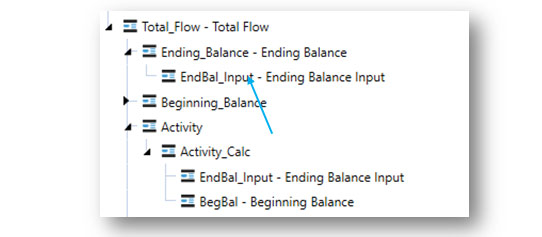
- Load data into the Flow dimension member called EndBal_Input.
- Create a new flow hierarchy with Activity_Calc as a parent to EndBal_Input and BegBal.
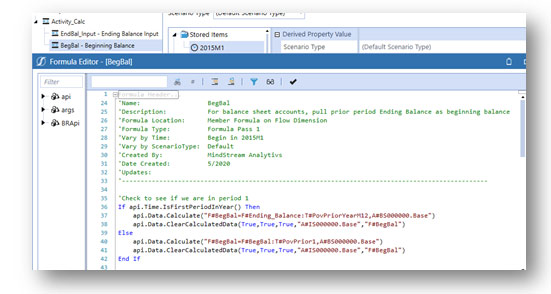
BegBal Formula
- Set a member formula on the BegBal member.
- The formula pulls the prior period’s ending balance so that, when used with the current ending balance for a balance sheet account, it returns only the change in the balance sheet account balance between periods within Activity_Calc.
- For period 1, the BegBal formula pulls the prior year-end ending balance and runs only on the base level members of the balance sheet hierarchy.
- For all other periods, the BegBal formula pulls the prior period ending balance and runs only on the base level members of the balance sheet hierarchy.
- There is also a statement to clear any BegBal that might calculate for income statement base accounts.
Validate Balance Sheet Accounts and Period Movements
Before promoting the design, validate opening balances, current-period ending balances, calculated activity, year transitions, and consolidated totals. Test positive and negative movements and confirm that period-one logic references the correct prior-year ending balance. Reconcile the result to the legacy report so finance users can see how balance sheet accounts and income statement activity contribute to each calculated metric.
Summary
Legacy reporting tools often present challenges when implementing a replacement system. Clients can be satisfied with the reporting that was available and might not understand the differences in functionality of the replacement versus the legacy. The solution noted here is not overly complex, but it did require time and understanding of the client’s history and needs to develop a solution that would work for them. Thankfully, OneStream XF has a great deal of flexibility within its functionality to integrate this solution into the implemented application.
MindStream Analytics
Want to learn more about the Flow dimension and OneStream Software? Please complete the form below and we’ll get back to you shortly.
Related OneStream Financial Reporting Resources
Continue with our guides to OneStream consolidation, confirmation rules and data quality, workflow calculation definitions, attribute dimensions, and scaling, rounding, and footing. For product reference material, visit the official OneStream documentation.