How FDMEE Import Formats Read Source Files
FDMEE import formats connect source-file columns with the dimensions and amounts required by your target application.
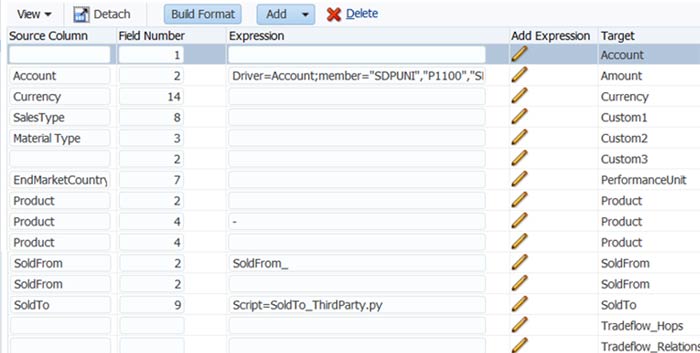
Import formats are the mechanism that allows FDMEE to read and parse the source extract file. The import format identifies the file type, such as a delimited CSV, and what information to pull from the file directly from the data source without manual file manipulation.
Each data load location must be assigned an import group that will be used when importing data files. Import groups instruct FDMEE on how to interpret source files and transform them into data that can be loaded into the Hyperion Planning data structure.
More data can be included in the file than match the dimensions and mapped via the FDMEE mapping tool and or ignored.
The import format form is arranged in a master detail format. In FDMEE, the top grid of the Import Format module shows the import group, and the bottom grid is where the fields for a group are defined.
Once the import format is created, the source file layout must remain the same for future data loading. Should the source file format change, the import will fail and the corresponding import format will need to be updated.
Using Import Scripts
Import Scripts are commonly used to manipulate source data upon importing a source file into FDMEE. Import scripts are executed during the import process, while source data is being imported into FDMEE, and run on every line of the source file being imported.
When Hyperion FDMEE reads a source file, it automatically skips every line that does not contain a valid or 0.00 amount, but scripts in the Amount field will still be executed.
Configure FDMEE Import Formats Step by Step
Inspect a Representative Source File
Begin with a representative extract from the source system. Identify the delimiter, column order, account and entity fields, and the amount column. Include examples containing negative values, zero amounts, blank fields, and any headers or trailers that appear in normal production files.
For FDMEE import formats, document where each required field originates before configuring the target mapping. A small sample makes it easier to trace an unexpected value back to the source record.
Assign Fields and Review Transformations
Define the source fields for the dimensions and amount, then associate the format with the intended location. Keep source-column definitions separate from member mappings: reading an account from a file and translating that account into a target member are related but different configuration tasks.
Use an import expression or script only when the standard field definition does not meet the requirement. For on-premises FDMEE, Oracle documents Jython import scripts for file-based loads; do not assume those scripting capabilities are available in Cloud EPM.
Test Before Reusing the Format
Validate FDMEE import formats with the sample file before scheduling recurring loads. Check imported rows, rejected records, source amounts, and the resulting target members. Compare totals with the original extract and investigate discrepancies before accepting the result.
Keep the approved sample and configuration notes together. When a source system changes its extract layout, repeat these checks before the next production load.
Record the file owner, expected delivery schedule, and the person responsible for approving layout changes. Agree how failed imports will be reported and corrected. A repeatable review process helps distinguish problems in the source extract from issues in field definitions, mappings, or custom script logic.
Assign ownership for maintaining each approved import format.