OneStream XF: Powerful Built-In Reporting Efficiency
Why spend time and money developing something that OneStream XF offers out of the box? Other software solutions require consulting expenses to develop a way to provide Finance with a TTM (Trailing 12 Month) P&L statement. Since they only provide Periodic, QTD, or YTD views as part of the out-of-the-box solution, this limits users to data views within the current year.
As part of the costly development of TTM, there is always testing, UAT, and rework, which only adds time and expense to the project timeline. The developer would have to build calculations, typically using up a Custom Dimension, and then apply the calculation to the P&L accounts.
Why OneStream XF Built-In Reporting Saves Time
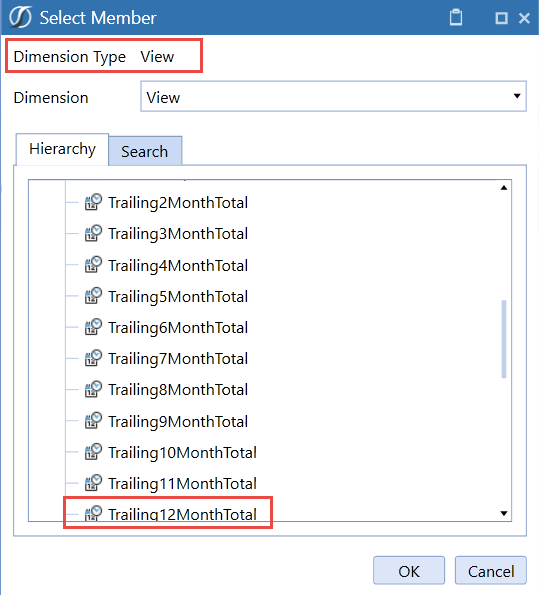
With OneStream XF, a TTM P&L is one click away, as OneStream has incorporated TTM as a selection in the view dimension. Of course, OneStream XF offers the standard Periodic, QTD, and YTD views, but also includes many other selections out of the box.
The beauty of additional OneStream XF view dimension options is that once you have built a P&L, you can simply change your POV of the view dimension and see your report as a Trailing 12 Months report without building a separate one. In addition, if a Controller wants to report income statement accounts in a trailing 2-month, 6-month, and so on, those options are all available, from Trailing2MonthTotal through Trailing12MonthTotal.
Check back for more updates as we blog about additional software features and their efficiencies.
MindStream Analytics
Want to know more about how our consultants can help your Finance team? Please complete the form below and we’ll get back to you shortly.
When Built-In Reporting Beats Custom Development
A built-in view is usually the better choice when it satisfies the reporting requirement without custom calculations. It avoids design workshops, development cycles, regression testing, user acceptance testing, and the maintenance burden that follows every platform or metadata change.
Finance teams also gain a consistent definition of trailing-period results. Instead of maintaining separate calculations or consuming a Custom Dimension, administrators can rely on the platform’s view logic and keep the dimensional model available for business-specific analysis.
Custom development still has a place when requirements depend on unique calculations, external data, specialized presentation, or controls that standard View members cannot provide. The practical decision is to compare the business requirement with available functionality first, estimate the full lifecycle cost of customization, and build only the remaining gap. This keeps the solution simpler for end users and easier for administrators to support.
How Finance Teams Use Trailing-Period Views
Trailing-period views help controllers compare current performance with a moving window that crosses fiscal-year boundaries. A user can open an existing profit-and-loss report, change the View member in the point of view, and review two, six, nine, or twelve trailing months without creating another report.
This approach supports management reporting, trend analysis, variance review, and recurring forecast discussions. Because the same report layout remains in place, users spend less time reconciling multiple versions and more time interpreting the financial result.
Implementation and Governance Checklist
Before rollout, confirm that the selected View members produce the expected aggregation for every relevant scenario, time period, and account hierarchy. Test security, report books, dashboards, and Excel-based consumption where applicable.
Document the approved trailing-period definitions, train users to change the POV safely, and monitor report performance. These simple controls preserve the efficiency of the built-in feature while keeping reporting accurate and supportable.
Related OneStream Reporting Resources
Continue with OneStream dashboard help buttons, dynamic dashboard buttons, balance sheet and income statement hierarchies, streamlined dashboard reporting, and OneStream reporting packages. Consult the official OneStream documentation for current platform guidance.