How to make dashboard button visible only to administrators
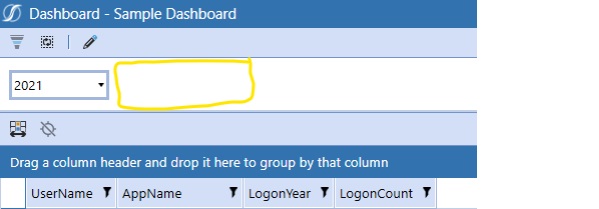
In the Dashboard below I want to hide the Save button from anyone not in the Administrator Security Group.
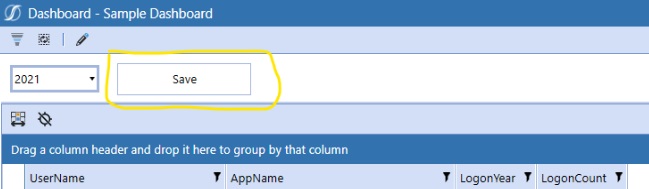
The visibility of a button on a dashboard is controlled by the display format component property.
isVisible = False The button will not be seen.
isVisible = True The button will be seen.
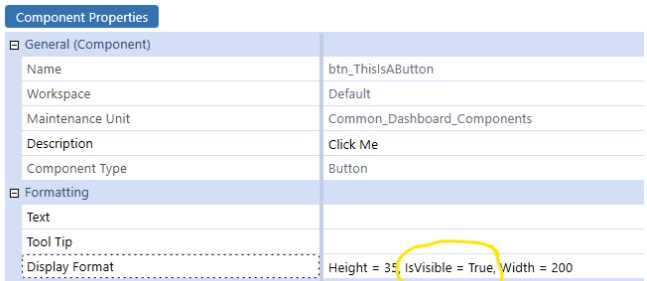
What we want to do is toggle the isVisible value of True or False of this button, based on if a user is in the Administrator security group. This will toggle the visibility of the button on or off based on the security rights of the user.
**How to do this?**
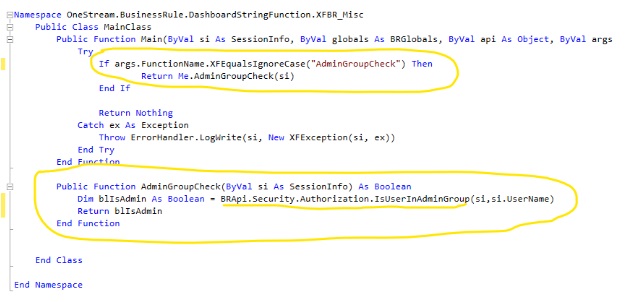
One way is through the use of a Dashboard XFBR and the BRapi.Security.Authorization.IsUserInAdminGroup function. This function returns a Boolean True or False value when passed a UserName.

- 1.The first step is to create a function within a Dashboard XFBR Business Rule.
- 2. Give the function a name that will be used in the XFBR call from the button. In the example below I called it “AdminGroupCheck”
- 3. In this custom function call BRapi.Security.Authorization.IsUserInAdminGroup. You will need to pass in the User Name of the logged in user. This can be accomplished by using the OneStream function si.UserName which dynamically retrieves the logged in user name as a string. Have the function return its Boolean value to a Boolean Variable. In the example below I am returning it to blIsAdmin.
- 4. Set the function return to the Boolean variable (Return blIsAdmin in the example below). A screenshot of a computer code
- The final step is to call this XFBR in the isVisible Display Format property of the Button. (don’t forget to save your change)
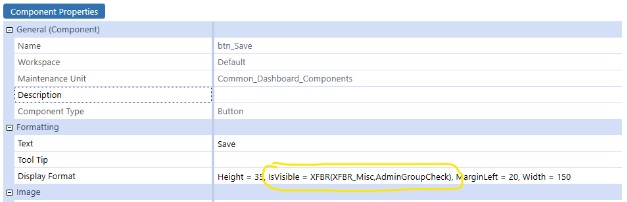
Now if a user who is not an Administrator navigates to this dashboard, they will not see the Save Button.