How to Prevent and Resolve OAC User Locks
OAC user locks can interrupt backups, data access, and administrative work when expired or mismatched credentials continue generating failed sign-in attempts. This guide explains how Oracle Analytics Cloud and Essbase administrators can identify the source of a lockout, restore access, and prevent stored service credentials from locking the account again.
Generally, when an Oracle Analytics Cloud (OAC) Essbase user attempts to log in unsuccessfully a consecutive number of times in Oracle Identity Cloud Service, the users’ account will lock. The user then receives a notification that contains a link that the user can click to reset their password and unlock their account. An administrator also can unlock accounts without requiring a password reset.
However, rarely, an admin user’s account locks periodically when the user has reset their password and hasn’t entered an invalid password after the reset. The periods between lockouts depend on the frequency of the service instance access storage runs (for example database backups) as well as the Identity Domain Cloud Service (IDCS) setting for ‘Number of failed attempts before locking account’. The max number is configurable in IDCS.
Typically, the admin user’s account locks after resetting the password when the password has expired. For the admin, the password stored in the storage configuration should change immediately after or before expiration to prevent each subsequent run of backup resulting in an invalid login attempt. If this is not changed prior to expiration, the user’s account will lock after the backup run meets the number of failed login attempts per the Password policy.
To prevent the admin user’s account from periodic locks, the admin user should change their password before it expires per the IDCS password policy. Your OAC Essbase password policy can be found at adminconsole –> Settings –> Password Policy.
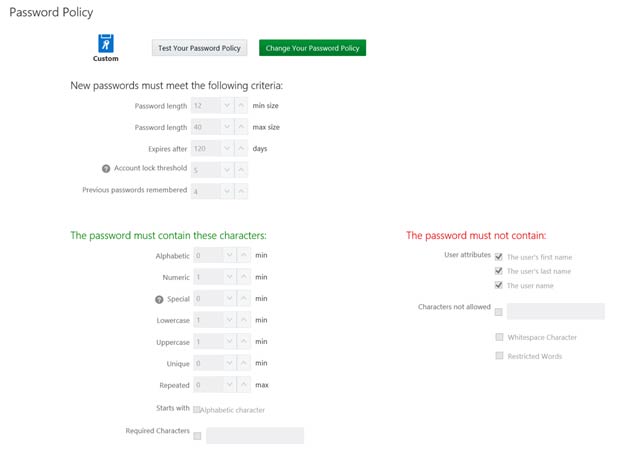
If the admin user’s account password expires prior to reset, restore the password to the original value before the expiration. To do this, the password likely needs to reset to unique values multiple times based on the number of “Previous passwords remembered” in the password policy. In the example above, the admin password should be reset 4 times before restoring to the expired password value.
After this, if you require a new password, you can leave the password as is until the next account is due to expire, or you can successfully change the password to a new value. If you change the password after restoring, be sure to immediately identify all services storing the password and change the password value prior to the next backup run.
Why OAC User Locks Affect Administrator Accounts
Repeated OAC user locks often point to an automated process that still holds an old password. A backup, storage-access job, integration, or scheduled service can continue authenticating after the administrator changes the interactive sign-in password. Each run adds another failed attempt until the identity-domain threshold is reached.
Begin by checking the identity-domain password policy, including the failed-attempt threshold, password expiration period, automatic-unlock setting, and number of previous passwords remembered. Then review every service configuration that uses the affected account. The stored password should be updated immediately whenever the administrator password changes.
If the account is already locked, an authorized administrator can unlock it from the identity-domain user record. When password history prevents immediate reuse of an earlier value, follow the configured policy carefully and avoid repeated guesses. Confirm that interactive sign-in works before restarting scheduled services.
After recovery, monitor the next backup and other automated runs. If OAC user locks return, review audit events and authentication timestamps to identify the process submitting obsolete credentials. A dedicated service account, documented ownership, expiration reminders, and a credential-rotation checklist reduce the chance of another outage.
OAC Security and Analytics Resources
For more guidance on OAC user locks, explore Oracle Analytics Cloud services, connecting OAC to on-premise sources, what OBIEE is, Oracle BI Cloud Services, Oracle Analytics Cloud Explain. Also review the official Oracle documentation for unlocking users.