How Sorting Entities in OneStream Improves Selection

Sorting entities in OneStream alphabetically makes long member lists easier to scan and improves the experience of selecting an entity from a combo box. This guide shows how an XFBR string can retrieve base members from a hierarchy, order them by name, and return a clean list for a dashboard parameter.
OneStream does a great job grabbing dimensions and their members rather easy. Most of the time a user will just grab a parent and then use a member expansion to grab its children, base members or all its descendants. Doing so gives the users a list of the members exactly how they appear in the hierarchy. This may be great for some cases but if a user wants to search through the list for a specific member, it may be hard to find depending on how the hierarchy is set up.
For this example, we will look at a list of Entities that we are having a user select from using a comb box. The list is derived using a parameter and we are grabbing the base Members from the top parent âUSâ and the list will display each base member exactly how the hierarchy is set up.

The image on the left shows how the hierarchy is set up in the dimension and the image on the right shows the list that is created using a member filter âE#US.baseâ.
|
|
|


Now, we updated the parameter to replace the âE#US.baseâ and instead input our XFBR string that helps sort the list of members alphabetical by name.

You can see now that the list on the combo box is in alphabetical order and makes it easier for a user to find an entity quicker.
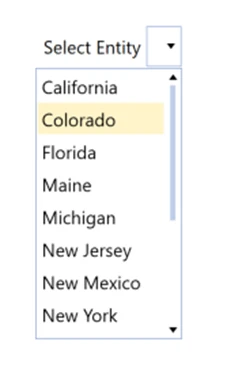
Below is the code used in the XFBR string that helped put the list on the combo box in alphabetical order. You basically just have to start off with creating a string of members you want to see âE#US.baseâ, tell OneStream that you want the list created to be In ascending order and then you just loop through the string and OneStream spits it out in alphabetical order!

XFBR Workflow for Sorting Entities in OneStream
Standard member expansions return entities in hierarchy order. That order is valuable when users need to understand parent-child relationships, but it can slow down selection when they already know the entity name. Sorting entities in OneStream gives the parameter a predictable alphabetical sequence without changing the underlying dimension.
The XFBR begins with the member filter that defines the required scope, such as the base members below a selected parent. The business rule retrieves the matching members, applies an ascending comparison to the desired name or display property, and builds the output string expected by the dashboard parameter.
Keep the hierarchy filter separate from the sorting logic. This makes the rule easier to maintain when the starting parent, entity scope, or display label changes. It also allows the same approach to support different parameters while preserving security and application-specific member access.
For reliable sorting entities in OneStream, test the XFBR with duplicate descriptions, special characters, inactive members, and users who have different security access. Confirm that the selected value remains the member name required by downstream logic even when the combo box displays a friendlier label.
Once validated, replace the original member-filter expression in the parameter with the XFBR call and refresh the dashboard. The combo box should contain the same authorized entities in a faster, easier-to-search order while leaving the source hierarchy unchanged.
Related OneStream XFBR and Dashboard Resources
For more guidance on sorting entities in OneStream, explore what OneStream is, OneStream software, OneStream consulting, setting a dashboard parameter default, displaying XF tables in dashboards. Also review the official OneStream documentation for member filters and XFBR.