OneStream dashboard parameter provides a practical, governed way to improve this OneStream reporting or dashboard requirement.

How to Set a OneStream Dashboard Parameter Default

When using parameters in a dashboard the Default Value doesn’t bring back the default value on the parameter settings. The default value can be set with a dashboard extender rule which is a fairly simple process and will be described below.

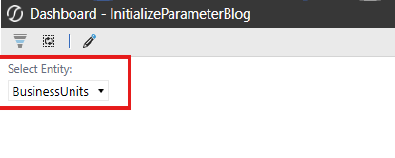
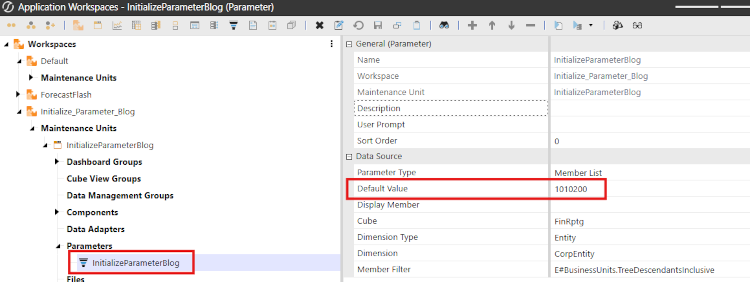
In this example, I have set a default entity value on the parameter, but when using it in a dashboard the default value is not showing up.

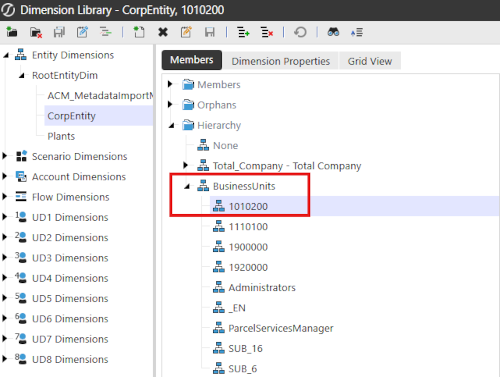
  • 1. In this simple example, I have set the default value for my parameter to be entity 1010200, however in the dashboard combo box it is coming back with the top entity parent.
    Dimension Library

    Application Workspace

    Select Entity

    • 2. There are just a couple steps to get the combo box to default to the entity member that is.
    • a.) Create a dashboard extender rule to set the default value for the parameter being used by the combo box
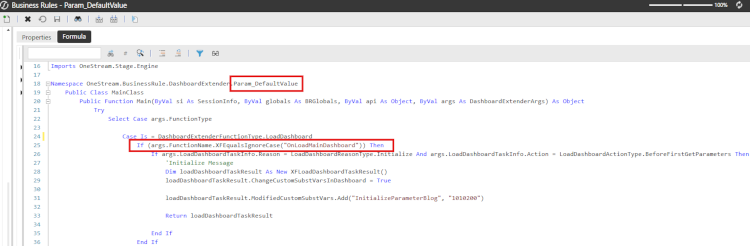

      Business Rules Formula

      Action Primary Dashboard

      Dashboard Groups

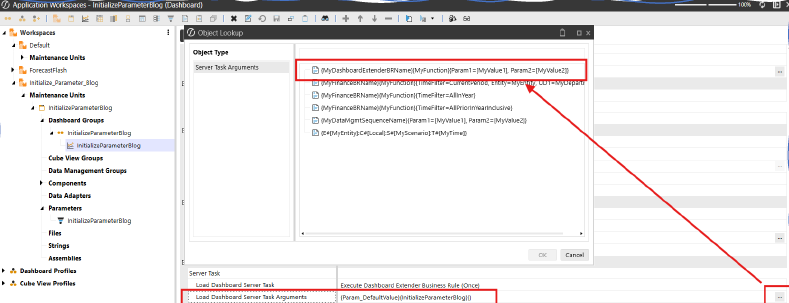
    • b.) Add a server task to the dashboard that contains the combo box / parameter that calls the dashboard extender rule and function
      • If you are unsure of the syntax that is needed for the Load Dashboard Server Task Arguments setting you can click on the ellipses to see the various options. The dashboard extender option is the first one (third screen shot).
  • 3. Now when you run the dashboard, or the dashboard refreshes it will default to the entity member that is desired.
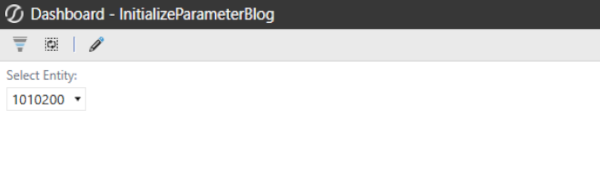
    Select Entity

  • 4. This was a very simple example, but based on the client’s requirements you can set the default value based on security groups, or other parameter selections within a dashboard as a couple examples. Getting familiar with dashboard extenders and it many uses will help taking your dashboards to a higher level.

Default-Value Validation and User Experience

A reliable OneStream dashboard parameter default should resolve to a valid member that the current user can access. Keep the extender function focused, validate the target value, and return a safe fallback when the preferred member is unavailable or excluded by security.

Test the OneStream dashboard parameter during the initial load, manual refresh, navigation from another dashboard, and changes to related parameters. Confirm that the server task runs at the intended point and does not overwrite a deliberate user selection after the dashboard has initialized.

Document the extender rule, function name, task arguments, parameter, and fallback behavior. Review the OneStream dashboard parameter after metadata or security changes, and log enough context to diagnose invalid members without exposing sensitive details.

Define the business requirement, expected user experience, technical owner, and support owner before implementation. Record the source configuration and approved result so later changes can be compared against a reliable baseline.

Build a test plan that covers normal operation, empty results, invalid selections, restricted access, metadata changes, and refresh behavior. Use representative users and production-like data without exposing confidential information.

Move the configuration through change control with peer review and a rollback plan. Confirm that names, parameters, formulas, and dependent components are consistent in each environment before promotion.

After deployment, monitor logs and user feedback during the first reporting cycles. Document common failure messages, diagnostic steps, and the person responsible for correcting configuration or security issues.

Keep component names and descriptions clear enough for another administrator to understand the design without reverse engineering it. Reference related rules and parameters directly in the maintenance notes.

Validate OneStream dashboard parameter with representative users, metadata, periods, and exception cases before production.

Contact

MindStream Analytics

Want to learn more about OneStream Software? Please complete the form below and we’ll get back to you shortly.