OneStream business rule performance depends on matching parallel execution to CPU-bound work, safe data access, and measurable tests.
With today’s multi-core processor servers, using concurrent programming can significantly boost the performance of your Business Rule Code. One common scenario where concurrency shines is looping through large datasets or performing repetitive tasks. By multithreading these loops, we can divide and conquer, processing chunks of data in parallel. In this post, we’ll discuss the “how” and “why” of multithreading for loops in both C# and VB.NET business rules.
How OneStream Business Rule Performance Improves with Multithreading
- 1. Performance: In applications that require extensive CPU-bound operations, like calculations in a loop, multithreading can exploit multiple cores of a CPU, executing processes concurrently and improving overall execution speed.
- 2. Responsiveness: In UI applications, offloading time-consuming loops to a separate thread keeps the user interface responsive. This ensures the application remains user-friendly, even during heavy processing.
- 3. Resource Utilization: Multithreading can optimize resource utilization. It ensures that while one thread is waiting for resources (e.g., I/O operations), another can continue executing, ensuring the CPU isn’t idling.
How to Multithread For Loops?
.NET offers several tools for parallelism, but for the sake of simplicity, we’ll focus on the Parallel.For method provided by the System.Threading.Tasks namespace.
VB.NET Example:
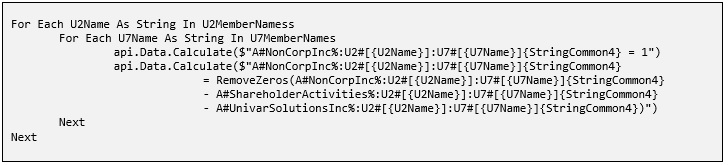
Let’s take a simple for loop that does some synchronous, one at a time, CPU-bound operation:
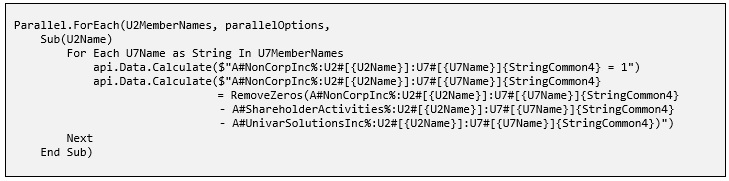
To multithread this loop using Parallel.For, the code becomes:
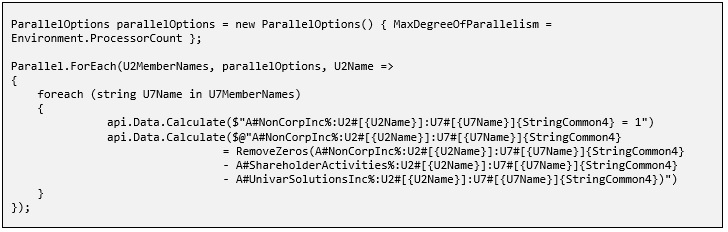
C# Example:

Things to Keep in Mind:
- 1. Not Always Faster: Introducing parallelism adds overhead. For small loops or tasks, the overhead might negate the benefits, even slowing down the execution. Always profile/time your application to see if multithreading offers real benefits.
- 2. Thread Safety: When multiple threads can access shared data simultaneously, race conditions can occur. Ensure that your operations within the loop are thread-safe. If needed, use locks, but be wary of potential deadlocks.
- 3. Max Degree of Parallelism: By default, Parallel.For utilizes as many system cores as available. However, you might not want to utilize all cores, especially in a shared system. Control this by setting MaxDegreeOfParallelism:


Ordering
Parallel execution doesn’t guarantee that the iterations will execute in order. If ordering is crucial, reconsider if parallelism is the right choice for your loop.
In conclusion, multithreading for loops in both C# and VB.NET can be a powerful tool to improve performance, especially in CPU-bound scenarios. However, like all tools, it should be used judiciously and appropriately, considering thread safety and the specific needs of the application. Try using a parallel for loop in your rule and note the change in performance.
OneStream Business Rule Performance Checklist
Before changing a production rule, capture a baseline for runtime, CPU use, data volume, and expected output. Test the same workload after introducing Parallel.For, and compare results under realistic concurrency. This makes OneStream business rule performance measurable instead of relying on assumptions.
For reliable OneStream business rule performance, keep each loop iteration independent, avoid shared mutable state, handle aggregated exceptions, and set MaxDegreeOfParallelism when unrestricted parallelism could compete with other server workloads. Confirm that results remain correct when iteration order changes.
Document test conditions, record the selected parallelism limit, and repeat the benchmark after data volumes or server resources change. This creates a reusable baseline for future tuning and reduces the risk of hidden regressions.
Related OneStream Resources
To strengthen OneStream business rule performance practices, review what OneStream is, OneStream implementation services, OneStream training, business-rule-driven dashboard security, and using return values in business rules. For the underlying API behavior and overloads, see Microsoft’s official Parallel.For documentation.