What Changed in NetSuite Analytics Warehouse Through 2026
What Changed Since the 2022 Launch
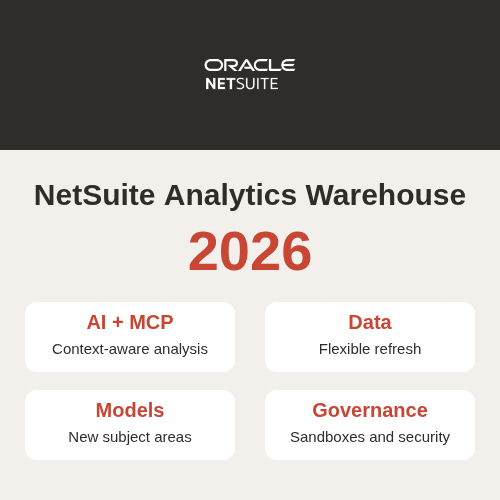
NSAW has grown from a packaged analytics warehouse for NetSuite ERP into a broader data, AI, and governance platform. The original value proposition remains: accelerate deployment with prebuilt pipelines, semantic models, subject areas, dashboards, and KPIs. What changed is the amount of control available to administrators and the number of ways teams can extend, refresh, secure, share, and analyze the data.
This article was first published in 2022 and previously highlighted frequent refreshes, improved security, new ERP subject areas, and third-party connectors. Those capabilities still matter, but they no longer describe the full product. The following update reflects official Oracle and NetSuite information available on November 3, 2026.
NSAW in 2024–2025: Refresh, Security, and AI
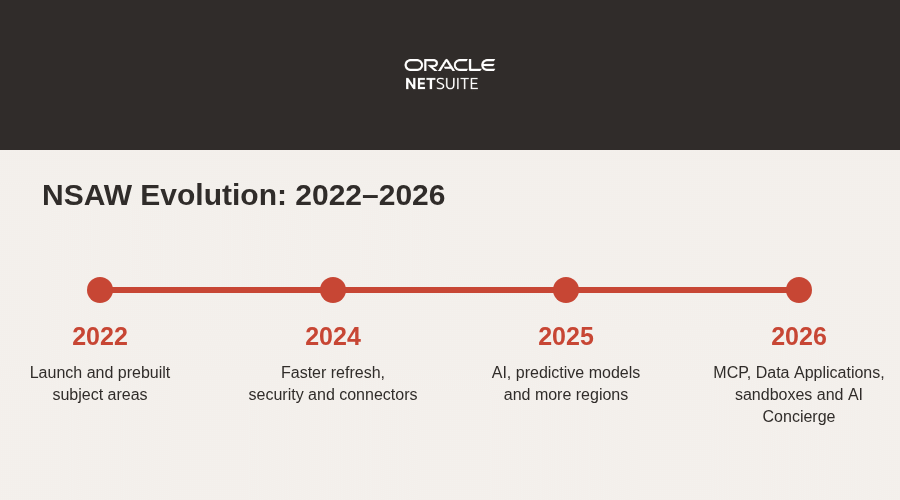
During 2024 and 2025, NSAW continued to expand refresh flexibility, security controls, regions, connectors, and prebuilt analytical content. Frequent refresh scheduling made it possible to prioritize selected tables and data augmentations instead of refreshing every model at the same cadence. Dimension-level security, the ability to hide prebuilt content, and identity-provider options gave administrators more precise control over access.
NetSuite also added subject areas and reports across financials, sales, purchasing, inventory, projects, and support. In August 2025 the service became available in the Chicago region, following earlier additions such as Phoenix and Mumbai. The 2025 product cycle also moved the platform toward AI-assisted analysis and predictive models, creating the foundation for the larger AI and data-management changes delivered in 2026.
NetSuite 2026.1: AI Connector Service and Larger Data Flows
The official NetSuite 2026.1 overview describes a major shift toward AI-ready analytics. The release introduced Oracle AI Database 26ai for the warehouse foundation and the NetSuite AI Connector Service for NetSuite Analytics Warehouse. The connector uses Model Context Protocol (MCP) to authenticate and securely connect supported external AI tools with governed warehouse data.
This makes it possible for an external large language model to analyze approved internal data while respecting the connection and access model. NetSuite cited tools such as Claude Desktop, Cline AI, and GitHub Copilot as examples. Organizations still need clear governance for permissions, confidential data, prompt handling, and the business validation of AI-generated conclusions.
Data flows also increased their supported volume from two million to five million rows per source. That change reduces the need to split large imports or run multiple loads. The 2026.1 NetSuite configuration page was redesigned with direct access to documentation, training, and release notes, and administrators gained the ability to transfer multi-select custom fields to the warehouse.
NSAW Platform 26.R1: Data Sharing, Change Capture, and Governance
Platform 26.R1 expanded NSAW beyond reporting inside the warehouse. Preview capabilities included capturing changed data during refreshes, sharing warehouse tables with external data stores, and publishing through an Oracle Object Storage target. These options support downstream integration and data-sharing patterns, although Preview features should be tested carefully before production use.
The platform also added automatic rotation of the Oracle Autonomous AI Lakehouse wallet, an estimated completion time for application upgrades, and integration with content-sharing platforms such as Slack and X. Catalogs and visualizations were reorganized in early 2026, and several older folders and visualizations were deprecated and replaced. Teams with bookmarked or embedded content should review those changes before upgrades.
NSAW Platform 26.R2: Data Applications, Observability, and Sandboxes
In June 2026, Custom Data Configurations were renamed Data Applications. Data Augmentation Scripts-based applications gained frequent refresh support, folder organization, and editor shortcuts. A new Data Pipeline Status page exposed extraction sources and publish targets, while warehouse refresh statistics gained factor-level detail to explain what affected each refresh.
After Platform 26.R2, application upgrades no longer trigger a data refresh. Scheduled incremental refreshes handle the next update, so administrators should verify the refresh schedule and last published data after an upgrade. Subscription changes can now flow automatically from NetSuite to the warehouse instance, and administrators can manage users and groups from the NetSuite Analytics Warehouse configuration page inside NetSuite.
The semantic-model extension process also moved toward the Sandbox framework. Oracle announced the Branch framework deprecation for September 1, 2026, with automatic migration in 26.R3 when necessary. The sandbox workflow supports validation, merge-to-main, publishing, and stronger conflict management for multiple developers.
Application 26.R2: Security, Revenue, and New Dashboards
The 26.R2 application release added row-level security for sales-related subject areas so sales representatives can be restricted to their own data while managers receive broader visibility. Revenue Recognition gained links from revenue arrangement lines to the line-level details of related sales transactions. Oracle also added AP Aging, AR Aging, and Stock Ledger dashboards.
Oracle replaced 26.R2 with a mandatory 26.R2.P1 patch because of a backward-compatibility issue affecting Oracle Analytics Cloud data flows that used subject-area datasets. Administrators who encountered 26.R2 were instructed to use the Release Updates tile; the patch included the release features plus the compatibility fix.
NSAW Platform 26.R3 and Application 26.R3
August 2026 brought the broadest recent platform update. Preview EPM integrator connectors were added for FCCS, Planning, Profitability and Cost Management, and Tax Reporting. Oracle recommends the integrator connectors instead of the older EPM connectors. Specialized reload can process only the necessary part of a functional area, while flat-file loading now supports SFTP, Azure, and Oracle Object Storage sources using flat or standard folder layouts.
NSAW gained richer refresh details, a prebuilt warehouse-refresh-statistics subject area, security and role-mapping CSV reports, and improved bundle diagnostics. AI Concierge can help administrators configure incremental-refresh stages and assist with semantic-model extensions using natural language. The Branch framework was removed after migration to Sandbox, and a September update added Sync with Main when sandbox conflicts are detected.
Application 26.R3.P1 introduced the Spend Classification subject area as a Preview feature, new Purchase by Vendor, Inventory Valuation, and Sales Orders by Customer reports, enhanced purchasing content, and Oracle Analytics Cloud home pages for Finance and Sales.
NetSuite 2026.2 and the October 2026 Status
The NetSuite 2026.2 release page highlights predictive models for spend classification and product recommendation. A September monthly update separated enabling the NetSuite Analytics Warehouse feature from creating the warehouse instance: administrators create an instance from the configuration page, and disabling the feature later stops the data pipeline without deleting the existing instance.
As of November 3, 2026, the latest entries in Oracle’s What’s New for Oracle NetSuite Analytics Warehouse are 26.R3.P3 and 26.R3.P4 from October. Oracle describes both as application updates that address bugs rather than feature releases. That distinction matters: product teams should verify their installed application and platform versions instead of assuming every monthly patch changes user-facing functionality.
What NSAW Administrators Should Do Now
First, review Release Updates in the console and confirm required patches, scheduled deadlines, source connections, and active data pipelines. Oracle says major releases are quarterly, patches are generally monthly, and emergency fixes can arrive as needed. Except for emergency patches, administrators can schedule updates before the Oracle deadline; the service applies them automatically after that deadline.
Second, inventory catalog links, deprecated visualizations, semantic-model branches, refresh schedules, custom fields, external connectors, and notification recipients. Use an email distribution list for instance notifications. Test Preview capabilities and AI integrations in a governed environment, and document which roles may access warehouse data through MCP or other sharing mechanisms.
Finally, treat NSAW as a managed analytics product rather than a one-time implementation. Review subject-area changes, new dashboards, data-quality checks, refresh statistics, security mappings, and performance after every major release. The product is substantially more capable than it was in 2022, but the new flexibility also increases the importance of release management and governance.
Related NetSuite Analytics Warehouse Resources
Continue with MindStream’s guides to NetSuite Analytics Warehouse, a modern introduction to the warehouse, frequent data refreshes, SuiteAnalytics versus NSAW, and NSAW versus NetSuite Planning and Budgeting. For authoritative details, use Oracle’s application-update guide and current release notes.