How a OneStream Primary Dashboard Controls Navigation


A OneStream primary dashboard acts as the parent container that controls how embedded dashboards, components, parameters, and actions work together. Understanding that relationship helps developers build navigation that is predictable, reusable, secure, and easier to maintain.
I’ve recently spent time with a client optimizing and cleaning up a dashboard implementation. As part of this I have noticed a recurring issue around Primary, or Main, Dashboards that could use clarification.
The term Dashboard is used interchangeably for a single dashboard or a Dashboard Group that contains many Dashboards, with most of them embedded in other Dashboards, to one degree or another. In fact, when you create a single Dashboard, OneStream creates an embedded Dashboard component based on the dashboard that you just created.
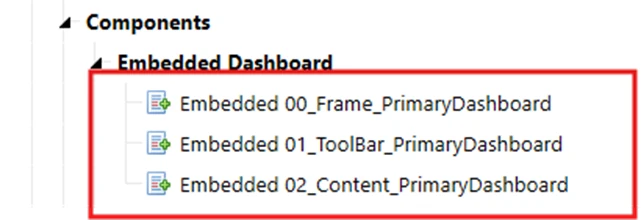
It is this embedded dashboard component that you add to other dashboards in the Dashboard Components tab of other Dashboards as you build out your Dashboard Group.
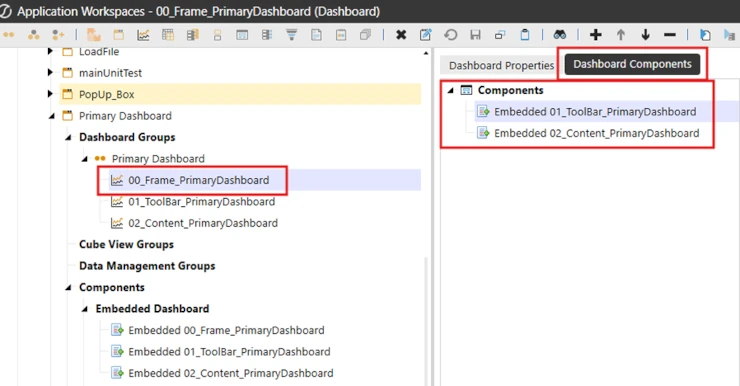
There is the concept of the Main Dashboard, or the Frame Dashboard that contains all the other embedded dashboards. It is this Main Dashboard that you tend to run, which then renders all the other embedded dashboards as one cohesive whole.
Technically that Main or Frame Dashboard is the Primary Dashboard. Embedded Dashboards are never the Primary Dashboard.
Importance of the Action Property in Primary Dashboards
Why is this important? The Action Property on the Dashboard Property Tab is why it’s important.
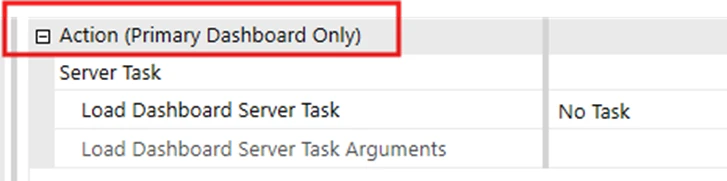
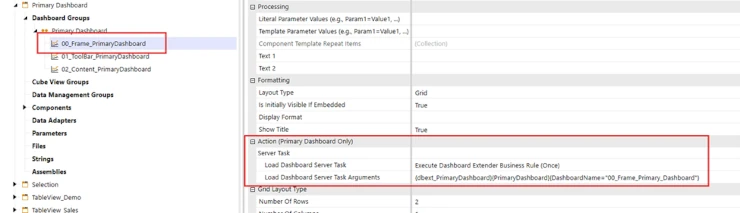
Note that the property group is labelled “Action (Primary Dashboard Only)”. This property will run a business rule if it’s configured properly and if it is added to the Primary Dashboard. I have seen too many cases where this has been configured on a dashboard that is not a Primary Dashboard and as a result the called Dashboard Extender function will never run.

Why would it be set up on a non-primary Dashboard? My assumption is that whoever did this just did not realize that it does nothing on a non-primary Dashboard.
Demonstrating the Primary Dashboard Functionality
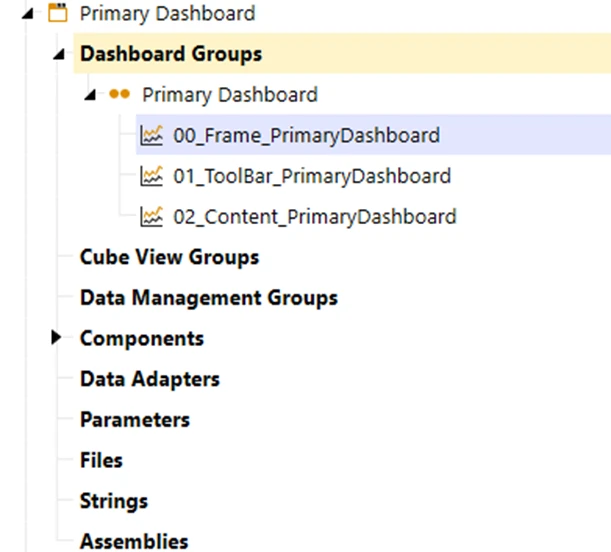
To prove this out and for demonstration purposes I have created a Dashboard Group that is made up of 3 dashboards, 2 embedded in the first, which is the Primary Dashboard.
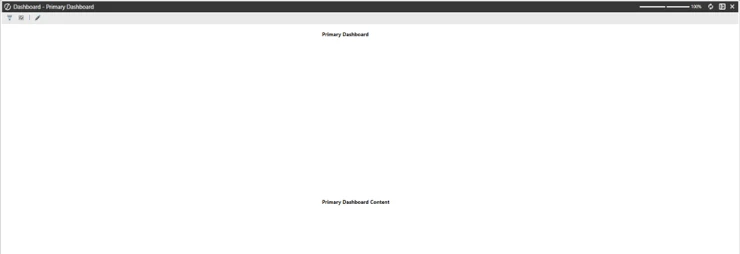
When the 00_Frame_PrimaryDashboard is run, it looks like the screen shot below.
I then configured the Primary Dashboard, 00_Frame_PrimaryDashboard, to run a Dashboard Extender.
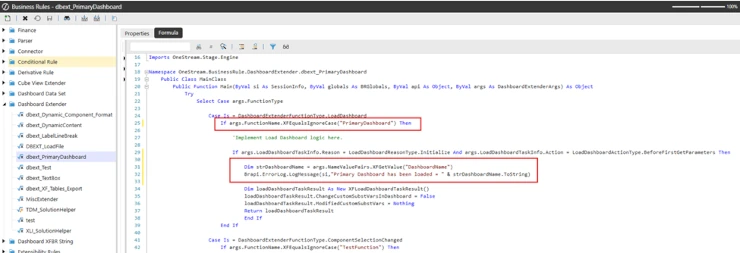
The Dashboard Extender has a function added to the Load Dashboard Case section of the Dashboard Extender. This function writes the name value pair value to the Error Log when the Dashboard is loaded and if it is the primary dashboard.
Common Mistakes with Dashboard Extender Configuration
This is what you see in the Error Log, as expected, when the Primary Dashboard is loaded.

To prove that this dashboard extender will not run if called from an embedded dashboard I set up the Action Server Task properties on one of the embedded Dashboards to run the same Dashboard Extender, but I passed in a different value in the name value pairs. Then I loaded the Primary, or Main, dashboard again.
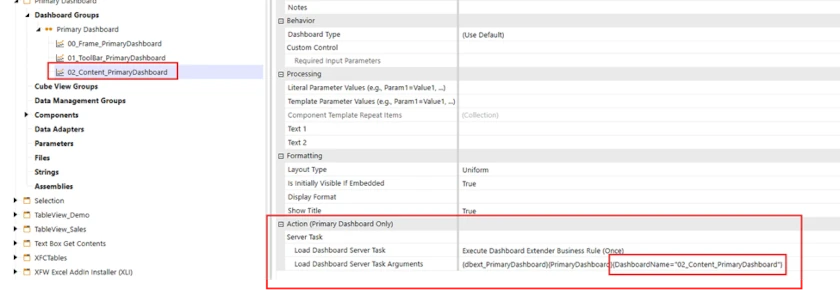
As expected, there was nothing written to the Error log on the load of this embedded dashboard.
To prove that the syntax of the Dashboard Function call is correct, if I run just the dashboard 02_Content_PrimaryDashboard and check the error log I will see the name value pair that I passed in from this dashboard in the error log.

It works this time because the dashboard was not run from its embedded state, but as a Primary Dashboard.
I hope that this clears up when to and when not to add a Dashboard Extender Function call to the Load Dashboard Server Task property on a Dashboard.
Contact
MindStream Analytics
Want to learn more about OneStream Software? The consultants at MindStream Analytics are here to help you take your consolidations and reporting to the next level.
OneStream Primary Dashboard Design Workflow
Start a OneStream primary dashboard by defining the user journey and the decisions the page must support. Identify which embedded dashboards provide context, detail, input, or actions. Keep the primary layer focused on orchestration instead of duplicating every component.
Configure Dashboard Extender actions and parameter passing deliberately. Test initial load, selection changes, refresh behavior, and navigation between embedded views. A OneStream primary dashboard should preserve the correct point of view and avoid unnecessary refreshes that slow the experience.
Security must be tested with representative roles. Confirm that components, Cube Views, adapters, files, and actions respect the intended access model. Validate empty-data, invalid-parameter, and timeout states so users receive a useful message instead of a broken page.
Document dashboard ownership, dependencies, parameters, actions, and release tests. Review performance with realistic data volumes and simplify components that do not help a user complete a task. This governance keeps the OneStream primary dashboard reliable as workflows evolve.
OneStream Primary Dashboard Resources
For more guidance on OneStream primary dashboard, explore OneStream dashboard services, visualizing data with OneStream dashboards, linking Cube Views to dashboards, displaying XF tables in dashboards, creating dashboard pop-up dialogs. Also review the official OneStream dashboards documentation.