- Trial Balance Load is Balanced (Assets = Liabilities + Equity)
- Specific accounts (i.e., Suspense account) have a balance that should be zero
- Prior Year Retained Earnings have changed
- Key Accounts (i.e., PPE, Goodwill, or Equity accounts) have changed
- Assurance all entities assigned to the workflow have data loaded
- EBITDA Sum Validation
Like many OneStream features, each Confirmation Rule can be configured to run for a specific frequency (i.e., All Time Periods, Monthly, Quarterly, or based on a specific Member Filter), allowing total customization for each rule.
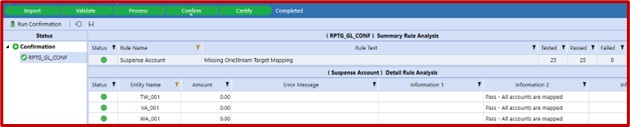
Each rule also has a pass/fail evaluation. If the rule passes, the status is Passed and is denoted by the green status icon. All 25 entities passed the rule “Suspense Account”, meaning no data was mapped to the target, and the workflow is certified and marked complete.
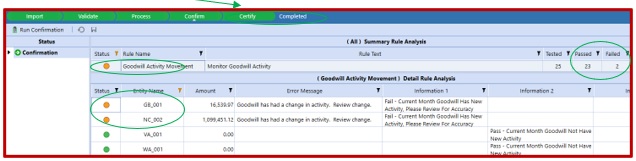
If the rule fails but the action is designated as a warning, the status is Failed and is denoted by the orange status icon. 23 out of 25 entities passed and 2 entities failed the rule âGoodwill Activity Movementâ, meaning there was a change in Goodwill for the month for the two entities shown in the Detail Rule Analysis section. The rule has a warning action on failure, so the workflow is certified and marked complete.
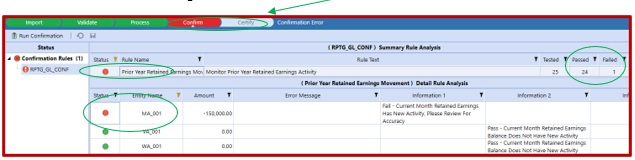
If the rule fails but the action is designated as an error, the status is Failed and is denoted by the red status icon. 24 out of 25 entities passed and 1 entity failed the rule âPrior Year Retained Earnings Movementâ, meaning there was a change in PY Retained Earnings for the month for the one entity shown in the Detail Rule Analysis section. The change needs to be investigated and corrective action taken in order to proceed. At this point the workflow cannot advance; however once data is corrected, confirmation rules can be run again to allow certification.
OneStream’s Confirmation Rules is a powerful feature that provides data quality feedback by evaluating system data as it is loaded for immediate feedback to the end-user. Creating these data quality checks alerts users early in the consolidation process, so corrective action can be taken to ensure more accurate and timely reporting. If you’re looking to streamline your consolidation process and provide data quality analysis, consider incorporating OneStream’s Confirmation Rules into your workflow.