OneStream security list box provides a practical, governed way to improve this OneStream reporting or dashboard requirement.

How a OneStream Security List Box Works

Clients frequently request limiting what users can see in OneStream based on security. These requests can vary greatly, but the following example can be used in a similar fashion in order to restrict, or grant access to “something” based on security, to fill the client’s requirement.

The example is going to show how to utilize security to display different lists in a List Box dashboard component.

How to execute the security-based list for your List Box Component?

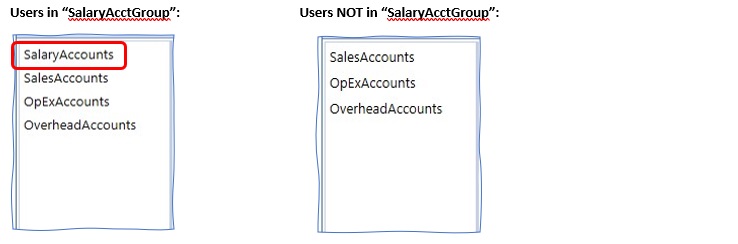
1. Create an XFBR for the Parameter with a Security Group Boolean check: In this simple example, we are checking to see whether the user is in the “SalaryAcctGroup” security group. If the user is IN the group, then it will bring back a list that INCLUDES “A#SalaryAccounts”. If the user is NOT in the group, then it will bring back the same list EXCLUDING “A#SalaryAccounts”.
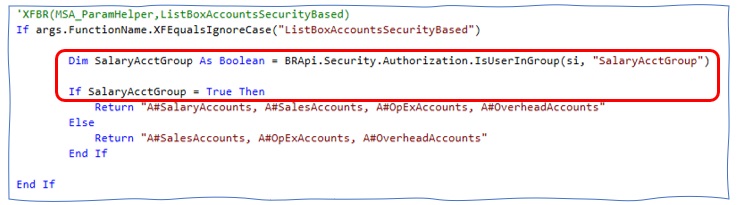
Create XFBR

2. Create a parameter to assign the XFBR to the Member Filter: With the parameter set up properly, it will return the appropriate member filter based on whether the user is in the “SalaryAcctGroup”.
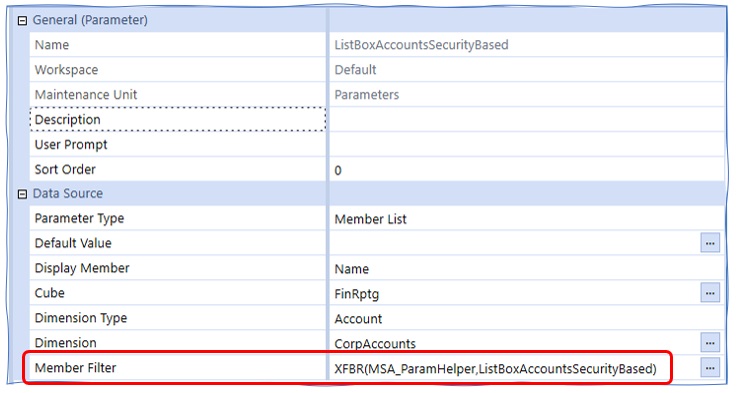
OneStream security list box

3. Create List Box and Assign the Parameter: The parameter that was created above is assigned as the Bound Parameter.
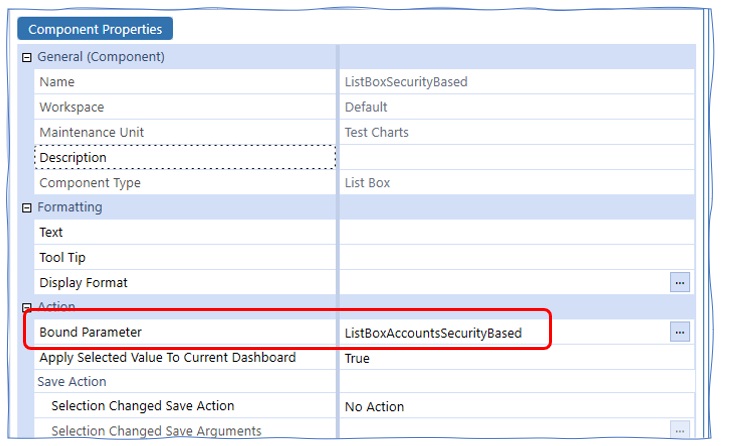
OneStream security list box

4. Results: What users will see in their respective List Box.
OneStream security list box

Security Design, Testing, and Maintenance

A OneStream security list box should return only members the signed-in user is authorized to select. Keep the security-group test inside a reusable XFBR, return a valid member filter for both authorized and unauthorized users, and avoid exposing restricted member names through labels, defaults, or error messages.

Test the OneStream security list box with users inside the group, outside the group, and assigned through nested groups. Confirm that the bound parameter refreshes when the user context or related selections change. Include an empty-result experience so a valid user receives a clear message instead of a broken dashboard.

Document the group, XFBR function, parameter, and dashboard components as one governed dependency. Review the OneStream security list box whenever security groups, metadata, or member-filter syntax changes, and retain screenshots or test evidence for each role.

Define the business requirement, expected user experience, technical owner, and support owner before implementation. Record the source configuration and approved result so later changes can be compared against a reliable baseline.

Build a test plan that covers normal operation, empty results, invalid selections, restricted access, metadata changes, and refresh behavior. Use representative users and production-like data without exposing confidential information.

Move the configuration through change control with peer review and a rollback plan. Confirm that names, parameters, formulas, and dependent components are consistent in each environment before promotion.

After deployment, monitor logs and user feedback during the first reporting cycles. Document common failure messages, diagnostic steps, and the person responsible for correcting configuration or security issues.

Keep component names and descriptions clear enough for another administrator to understand the design without reverse engineering it. Reference related rules and parameters directly in the maintenance notes.

Validate performance with realistic data volumes and concurrent users. A technically correct solution still needs acceptable response time and predictable behavior during close and reporting deadlines.

Review access with the application owner on a regular schedule. Remove obsolete dependencies, confirm current ownership, and retest critical paths after platform or application upgrades.

Validate OneStream security list box with representative users, metadata, periods, and exception cases before production.

Contact

MindStream Analytics

Want to learn more about OneStream Software? Please complete the form below and we’ll get back to you shortly.