What person responsible for financial reporting has not had to contend with rounding? I don’t know any. In previous lives and various tools, this has always been a challenge. In the manual spreadsheet world, sometimes 0.4 is rounded up and 0.6 is rounded down to enable footing.
The title of this is Scaling, Rounding and Footing , oh my, but could easily be a little “Tiptoe thru the Tulips” to get this built out as the solution that evolved here. Read on!
Requirement
Numbers must be reported on a scaled basis that is rounded to zero decimal places.
The practice of adding Rounding adjustments on a scaled basis is standard in the past solution.
Approach 1
Utilize the user defined dimension set as the data type.
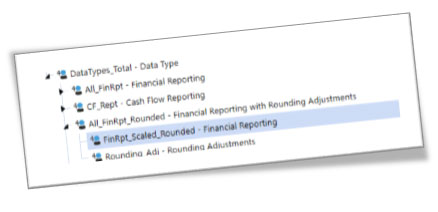
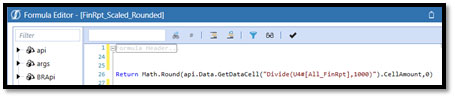
- Create a new user defined member in data type dimension (ex. FinRpt_Scaled_Rounded), set as DynamicCalc, that takes the whole currency value, scales it by 1000 and rounds it to zero decimal places.
- Create a new user defined member in data type dimension, (ex. Rounding_Adj), to be used for manual rounding adjustments, input via a form.
- Create a “total” user defined member (ex. All_FinRpt_Rounded) to add together FinRpt_Scaled_Rounded and Rounding_Adj. Since FinRpt_Scaled_Rounded is a Dynamic Calc, normal aggregation doesn’t work – the hierarchy below is purely visual – there is a formula in All_FinRpt_Rounded.

Issue
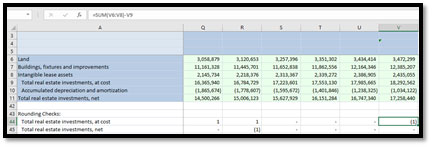
Dynamic Calc runs on parents (i.e., no aggregation – stored parent value is scaled and rounded) like base / children members. This can result in footing issues because the values to the “right” of the decimal that would add to the precision of the results are not there due to the rounding to zero decimal places.
Modified Approach 2
Find a non-DynamicCalc solution for base members and allow data to naturally aggregate (foot) up.
Challenge: To replicate the DynamicCalc function in OneStream non-dynamically. Let’s just say, it took a while and a lot of great minds!
Issue 2
Because values need to be scaled and rounded at all levels, the natural aggregation (i.e., footing) using Approach 2 is actually worse than the DynamicCalc (at parents) because the values to the “right” of the decimal adds to the footing precision of the results.
Executive management spot checks both the rounding and footing. Now do you get why it is important to get this to work?
Modified Approach 3
- Utilize the data type dimension and DynamicCalc formulae to scale and round data as in the original approach.
- Make adjustments to parent dimension members, potentially parent entities so as not to disrupt rounding at lower base / parent levels whose rounding has already been manually adjusted.
Issue 3
- Adjustments can be made to parent entities, NOT to other parent dimension members.
- Extensibility was not built into the application, so adjustment to parent members is not possible.
Final Approach
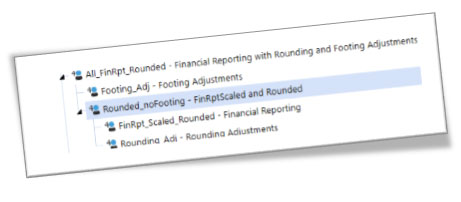
- User Defined Dimension – Data Type dimension
- Utilize the data type dimension and DynamicCalc formulae to scale and round data as in the original approach.
- Create a new user defined member for footing, ex. Footing_Adj
- Create a new sub-total user defined member, ex. Rounded_noFooting to sub-total rounding totals that can then be added to the Footing_Adj member

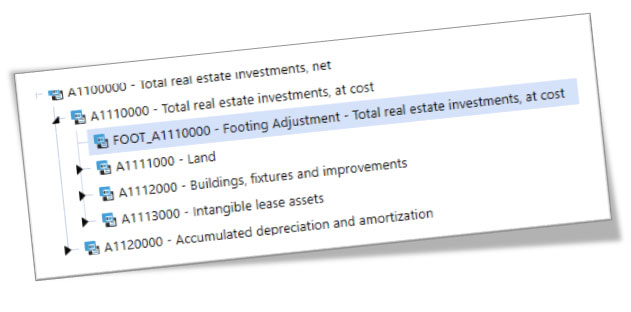
- Create new base level accounts below the total account members whose footing needs to be adjusted. These accounts, since they are base level accounts can be used, at parent entity levels using the Footing_Adj member to correct any necessary footing adjustments.
Summary
Scaling, rounding and footing numbers is never easy. The precision of the values to be aggregated is really the key to the footing – that is, the rounding. But it is all based on how the end user needs to see the data – in this case, NOTHING past the decimal.
Knowing what I know now makes me think that extensibility in every application may be the way to go – in this case, it might have been overload as all other data is captured at the base G/L data level. Extensibility for rounding, but you never know.
I also know that sometimes you just need to keep plugging away, take a break, grab a coffee, take a walk, take a nap, do something else. Then come back to it because that solution might just pop into your head. The last solution came about after hours (ok maybe days), but the final approach seems to be one that is reasonable and acceptable to the client.