
Blog - Extensible Documentation in OneStream: Revolutionizing Reporting
Introduction to Extensible Documentation (XF Docs)

In today’s fast-paced business environment, organizations are increasingly reliant on advanced tools to drive decision-making, ensure compliance, and enhance efficiency. OneStream’s Extensible Documentation (XF Docs) is an innovative solution that empowers businesses to seamlessly integrate data from the OneStream platform with familiar Microsoft Office tools like Word, Excel, and PowerPoint. This blog post explores how XF Docs revolutionizes reporting, compliance, and collaboration through its advanced features.
What Is Extensible Documentation?
Extensible Documentation, or XF Docs, allows organizations to embed OneStream content directly into Microsoft Office and text-based documents. This capability bridges the gap between structured data in the OneStream platform and unstructured formats often used for presentation and reporting.
Key features include:
- Seamless Integration: Embed Cube Views, Dashboard components, and specific cell values into Microsoft Word, Excel, PowerPoint, or text editors.
- Dynamic Updates: XF Docs dynamically update as the source data in OneStream changes, ensuring accuracy and consistency in reporting.
- Versatile Applications: Supports a wide range of use cases, from monthly variance reporting to compliance documentation.
By leveraging XF Docs, businesses can improve collaboration, streamline reporting workflows, and enhance data accuracy across departments.
Setting Up XF Docs with PowerPoint
Creating an Extensible Document in PowerPoint involves integrating live OneStream data into your presentations for dynamic and data-driven content. Here’s how you can set up an XF Doc:
Define Your Data Source:
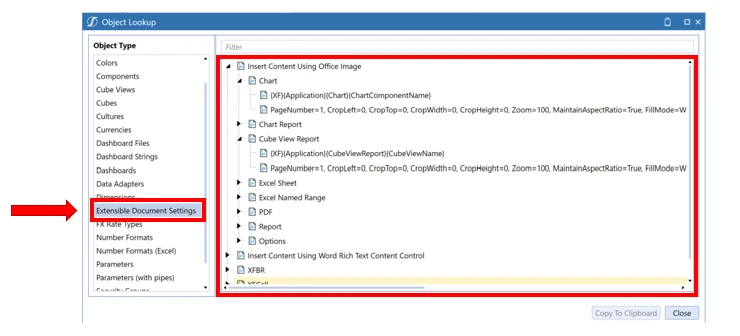
- Identify what you will need to bring into your XF Doc. If you are unsure what you can bring into an XF Doc, click the object lookup button and click Extensible Document Settings to get a list as well as the syntax you will need.
- Ensure the data is properly configured and accessible within the OneStream platform.

Prepare the PowerPoint Template:
- Open your PowerPoint file and determine where you want to integrate live data.
- Use placeholders or specific slides for data-driven content.
Embedding Live Data in PowerPoint
- In PowerPoint you will need to use an image file to pull in your live data and edit the Alt Text of that image.
- Right click on the image, choose View Alt Text, and you will get the Alt Text to show up in the right hand pane.
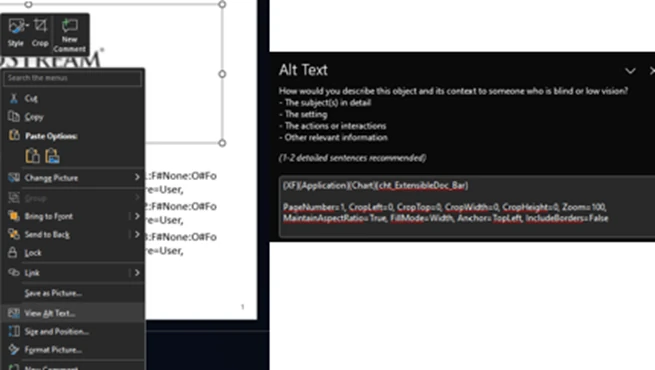
- This is where you will put in the syntax you saw in the object look up in Onestream. In this example I’m telling the XF Doc to look in the XF system, then application, that it is a Chart dashboard component, and the component name.
- The text as the bottom is how you can further refine the formatting to enhance the look of the data pulled into the XF Doc.
- XFCell can also being used for use cases such as wanting to bring in annotation data such as footnotes and explanations. Numerical data can be bring in as well. Below is an example of the syntax that would just be placed into a textbox.
- Substitution variables as well as parameters can be used in XF Docs as well which I wanted to point out in this example. Making this XF Doc dynamic and reusable month after month and year after year.

Validating and Distributing XF Docs
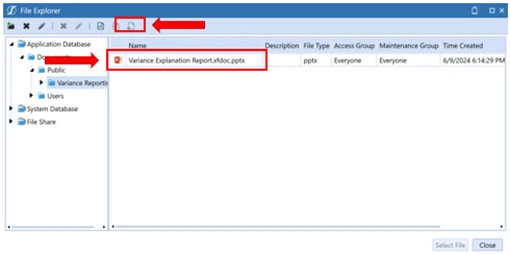
- Once the XF Doc is built it will need to be placed into Onestream File Explorer. That way the XF Doc has access to the path placed into the image’s alt text or by the XFCell call.
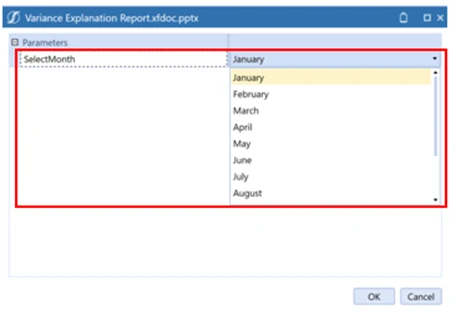
- Once within the application, all it takes is a double click of the file to retrieve your formatted live data. A parameter was embedded in this file so the user will have the ability to choose exactly what month of data they want to see.
- After selecting this month in this example, it can be any parameter necessary for your specific use case, just click Ok and the PowerPoint is ready to be viewed and distributed.

As you can see in this example, two cube views, a bar chart, and three lines of annotation data populated into the PowerPoint slide directly from the data residing within Onestream. No other data manipulation was necessary.
Contact MindStream Analytics

Want to learn more about OneStream Extensible Documentation? Please complete the form below and we'll get back to you shortly.
Featured Webinar

Unlock the power of OneStream Quickviews and elevate your financial planning and analysis (FP&A) process with this insightful webinar hosted by Erick Lewis of MindStream Analytics.
Partner SpotLight

OneStream CPM
OneStream aligns to your business needs and changes more quickly and easily than any other product by offering one platform and one model for all financial CPM solutions. OneStream employs Guided Workflows, validations and flexible mapping to deliver data quality confidence for all collections and analysis while reducing risk throughout the entire auditable financial process.