Understanding the Challenge of Line Breaks in OneStream Labels
The other day I was doing a very routine task, adding and formatting a Label component on a dashboard. The Label component contained a line of text that needed to wrap over 2 lines. “No Big Deal”, you are thinking to yourself, there is a display format setting, UseTextWrapping, that will do this for you, simply set it to True.
Yes, that works. However, what if you want to specify where to break the line of text? I’ve got you there, you can’t, but wait for it and I will show you a way of accomplishing this.
OneStream dynamically breaks the line of text in the Label based on the size of the Label component.
For example, I have a Label component set up in the screen shot below. The line of text is longer than the width of the Label component.
OneStream breaks the line of text after the letter “a”.
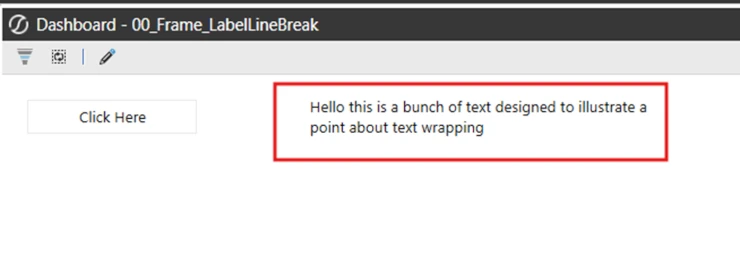
However, what if you wanted to break the line in a different spot, from the display format properties you can’t do this.
Step-by-Step Guide to Implementing a Line Break
You can do this using business rules and a parameter approach.
1. Create a Parameter and place the Parameter into the text properties box of the Label component.
2. Next you need to create a business rule that populates the value of the parameter. For demonstration purposes I am using a Button component that runs a dashboard extender.
3. For demonstration purposes I have a simple dashboard with a button and a label component on it.
Which when run, will show the following. The label isn’t visible yet because the Literal Parameter that contains the text value has not been populated yet.
4. Next create the Dashboard Extender that the Button will run. Its in this spot that the line break will be added to the text that the Label will show using a parameter. In your Dashboard Extender create a String variable to hold your line of text for the Label. However where you want a line break, concatenate into the string a Visual Basic Constat for a carriage return, vbCr.
Dim strLabelText As String = "Hello this is a bunch of text to" &vbCr & "illustrate a point about text wrapping"5. Then write that String to your Literal Parameter.
brapi.Dashboard.Parameters.SetLiteralParameterValue(si,False,args.PrimaryDashboard.WorkspaceID,"Default.p_LabelLineBreak",strLabelTextThe entire function is shown below.
Public Function GetLabelText(ByVal si As SessionInfo, ByVal globals As BRGlobals, ByVal api As Object, ByVal args As DashboardExtenderArgs) As Object
Try

Dim strLabelText As String = "Hello this is a bunch of text to" & vbCr & "illustrate a point about text wrapping"
brapi.Dashboard.Parameters.SetLiteralParameterValue(si,False,args.PrimaryDashboard.WorkspaceID,"Default.p_LabelLineBreak",strLabelText)
Return Nothing
Catch ex As Exception
Throw ErroHandler.LogWrite(si, New XFException (si, ex))

End Try
End Function
The Literal Parameter, once the Business Rule is called, will hold your line of text with a break where you have specified!
Here is the example with the business rule run, notice the line break.
To add to this, if you are not populating the parameter from code, you can still get this to work.
Alternative Method: Adding Line Breaks Without Code
Step 1. Open a text editor such as Word or Notepad++, type in your line of text for your label and enter a carriage return where you want the text to break.
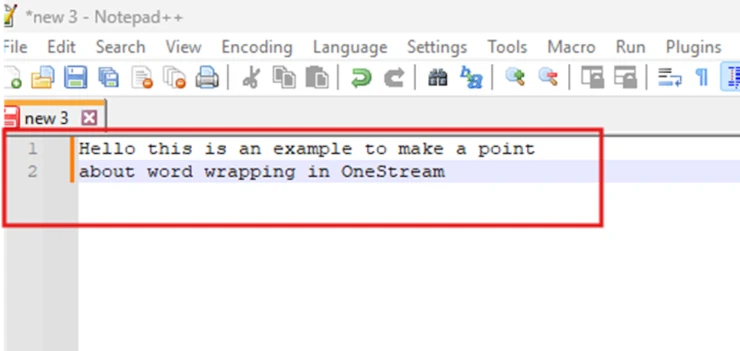
Step 2. Copy and paste both rows.
Step 3. In OneStream, select your parameter and the three ellipses in the Default Value property. Then paste your copied text from your text editor into the pop-up box that appears.
Now when you run your dashboard you will have a line break where you want it, without needing a business rule to accomplish this.
Partner SpotLight
OneStream aligns to your business needs and changes more quickly and easily than any other product by offering one platform and one model for all financial CPM solutions. OneStream employs Guided Workflows, validations and flexible mapping to deliver data quality confidence for all collections and analysis while reducing risk throughout the entire auditable financial process.
Case Studies
Accumen
Thanks to the intervention of MindStream Analytics, Accumen's Finance department can now model their business with a new, more organized structure that isn't conventionally available in NetSuite.
Acme Brick
Acme Brick turned to MindStream Analytics for help implementing OneStream to replace their outdated TM1 solution.
Alterra
Alterra sought the expertise of MindStream to address the challenges they faced in their Capital Planning process.
ATCO Group
Energy conglomerate ATCO operates worldwide in utilities, power generation, and related services.
Avalon
Working with MindStream Analytics, Avalon Healthcare Solutions adopts NetSuite Planning and Budgeting to accelerate budgeting and forecasting processes.
Bayer Health Care
Bayer Healthcare implemented Hyperion Planning and Workforce Planning in 10 weeks to dramatically streamline their Income Statement budget and Workforce Planning process..
BluEarth
MindStream Analytics' partnership with BluEarth Renewables epitomizes the power of technology and collaboration.
Celgene
An Oracle Hyperion Planning Upgrade provides multi-national organization Hyperion Application optimization and stabilization.
Cleaver Brooks
OneStream XF was chosen as the platform that would transform Cleaver-Brooks' Finance processes.
CoorsTek
The collaboration between CoorsTek and MindStream resulted in significant improvements in CoorsTek's financial consolidation and reporting processes.
Elite Body Sculpture
MindStream Analytics' collaboration with Elite Body Sculpture encapsulates the transformative potential of targeted tech solutions in streamlining administrative processes.
Enlyte
Enlyte, a merger of Mitchell, Genex, and Coventry, faced challenges with disparate financial solutions and the need for combined reporting.
Flanders
MindStream Analytics collaborated with Flanders to implement OneStream Consolidation and Reporting solution.
Foley Products
Foley Products was facing a significant challenge with its Excel-based actual management reporting system.
Harte Hanks
The collaboration between MindStream Analytics and Harte Hanks culminated in a highly customized, user-friendly NetSuite implementation.
Interface
Interface used a complex, manual, excel-based FP&A process for monthly review, and the summary data was loaded in OneStream.
Kymera International
Thanks to Mindstream Analytics' assistance, Kymera was able to load all of their data into OneStream and validate it successfully.
MacLean Fogg
MacLean-Fogg partnered with MindStream, a leading implementor specializing in modernizing and optimizing enterprise systems.
MEPPI
MindStream's expertise and experience were sought to conduct a vendor selection initiative focusing on MEPPI's F2023 planning process.
OUAI
MindStream Analytics and OUAI's collaboration showcases the transformative power of strategic technological intervention.
Plaskolite
By migrating to OneStream, Plaskolite has achieved a material reduction in consolidation time and overall Financial Close cycle, eliminated the hours spent compiling and verifying data in Excel, streamlined its Planning, Budgeting and Forecasting model and delivered flexible and timely reporting that enables more strategic analysis of their financial data.
Redwire
Understanding the nuances of Redwire's challenges, MindStream Analytics devised a holistic approach to overcome them. The implementation of NetSuite was just the beginning.
Simon
Simon's existing corporate Hyperion Financial Management (HFM) production application was consolidating at a rate of seven hours, a performance issue causing great headache to corporate Accounting.
Source Code
The successful transition to OneStream revolutionized Source Code's financial reporting.
Subway
Subway collaborated with MindStream Analytics for the NetSuite Analytics Warehouse implementation.
UPenn
MindStream Consulting and AppCare team members are proud be working side by side with UPenn university in accomplishing this implementation and along with continuing our AppCare services after go-live.
USG
USG was an Oracle Hyperion customer realizing that it needed more specialized support for its various Oracle Hyperion applications.
Vantiv
Dividing a hyperion planning application, expanding the hyperion footprint to forecast on the business? Customer categories.
Versant Health
Versant Health engaged MindStream to help resolve the challenges they were experiencing with their consolidation, close, and financial reporting processes.
Virginia Spaceport Authority
The MindStream team implemented the Standard + Workforce NetSuite Planning & Budgeting.
WeWork
MindStream Analytics determined that the best solution was to implement Oracle Essbase Cloud as part of the Oracle Analytics Cloud (OAC) platform-as-a-service
WindStream
Innovative use of essbase to streamline and connect hyperion financial management for enhanced financial analysis.
XY Planning
MindStream Analytics, well-versed in addressing such challenges, presented a comprehensive Netsuite solution for XY Planning.