Sorting Entities in OneStream
OneStream does a great job grabbing dimensions and their members rather easy. Most of the time a user will just grab a parent and then use a member expansion to grab its children, base members or all its descendants. Doing so gives the users a list of the members exactly how they appear in the hierarchy. This may be great for some cases but if a user wants to search through the list for a specific member, it may be hard to find depending on how the hierarchy is set up.
For this example, we will look at a list of Entities that we are having a user select from using a comb box. The list is derived using a parameter and we are grabbing the base Members from the top parent âUSâ and the list will display each base member exactly how the hierarchy is set up.

The image on the left shows how the hierarchy is set up in the dimension and the image on the right shows the list that is created using a member filter âE#US.baseâ.
|
|
|


Now, we updated the parameter to replace the âE#US.baseâ and instead input our XFBR string that helps sort the list of members alphabetical by name.

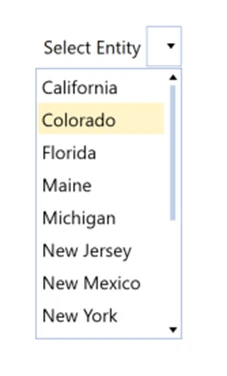
You can see now that the list on the combo box is in alphabetical order and makes it easier for a user to find an entity quicker.
Below is the code used in the XFBR string that helped put the list on the combo box in alphabetical order. You basically just have to start off with creating a string of members you want to see âE#US.baseâ, tell OneStream that you want the list created to be In ascending order and then you just loop through the string and OneStream spits it out in alphabetical order!