


EPM Dashboards and Reporting Guide
EPM dashboards and reporting help organizations turn enterprise performance data into clearer insight. While reports and dashboards are both valuable, they serve different purposes. Reports typically provide detailed information in a narrative, graphic, or tabular format, while dashboards provide a visual summary of the most important metrics that teams need to monitor at a glance.
When companies improve EPM dashboards and reporting, they make it easier for finance, operations, and executives to understand performance, spot issues faster, and support more informed decisions. A strong reporting environment balances detail with speed, giving users the right view for the task at hand.
Tools Used for EPM Dashboards and Reporting
- Hyperion Financial Reporting Studio (HFR)
- Hyperion SmartView
- Oracle Business Intelligence Enterprise Edition (OBIEE)
- Oracle Enterprise Performance Reporting Cloud Service (EPRCS)
- CXO – Cockpit
Hyperion Financial Reporting Studio (HFR)
- Tool for designing and presenting analytic data graphically
- Object oriented graphical report layout using: Text Boxes, Grids, Images, and Charts
- Integrates with HFM, Hyperion Planning, and Essbase
- Objects can be used across multiple reports
- Report build performed on the Win32 client
- Report output available in HTML, PDF and XLS
Hyperion Smart View
Smart View allows users to view, import, manipulate, distribute and share data from various data sources using Microsoft Excel, Word, Outlook and PowerPoint.
- Tool for designing and presenting analytic data graphically
- Object oriented graphical report layout using: Text Boxes, Grids, Images, and Charts
- Integrates with HFM, Hyperion Planning, and Essbase
- Objects can be used across multiple reports
- Report build performed on the Win32 client
- Report output available in HTML, PDF and XLS
Typical uses include:
| Data Integration with:
|
Dynamic data analysis utilized to perform queries
- Drill into dimensions
- Utilize Excel formulas
- Can pivot data between rows and columns
Best when used with HFM. May be used with Essbase or Planning but may have performance issues.
- HS Function retrieves data from source
- Manual Data Entry
Best when used with HFM. May be used with Essbase or Planning but may have performance issues.
- HS Function retrieves data from source
- Manual Data Entry
OBIEE
Oracle Business Intelligence Enterprise Edition (OBIEE) is a package of reporting and analytics tools that provides a robust and scalable solution for providing insight into the reality of your business.
- Connects to nearly any source
- Queries relational databases, data cubes, flat files, big data sources and many other technologies
- Provides historical, real time, and predictive analytics capabilities
- Integrates with a wide variety of technologies including Oracle’s CRM, E-Business Suite, and Hyperion platforms
- Oracle sells pre-packaged applications that contain out of the box integrations with Oracle products like CRM, E Business Suite and Hyperion tools
Flexible reporting with a wide variety of visualization options
Flexible reporting with a wide variety of visualization options
- Logical data model is stored in a metadata repository to limit the amount of technical details a user needs to be successful and is organized by subject area
- Available attributes are listed on the left, selected items appear on the right, as well as filter conditions
- Supports SQL calculations and commands, including case statements and statistical functions
Enterprise Performance Reporting Cloud Service (EPRCS)
- Distribution: Users simultaneously updating different sections or doclets of reports
- Task Management: Notification of upcoming deliverables or alerts
- Reporting: External, Internal and Statutory Financial Reporting Needs
- Complete: Authoring, collaboration, commentary and delivery, including versioning
- Workflow: Approve report sections and monitor the overall process
- Secure: Role-based, auditable access on desktop and mobile devices
- Integrate data and metadata from various Oracle and non-Oracle sources, including EPM, BI, ERP, OBIEE, RDBMS, and Microsoft via Smart View. You can build an application in EPRCS to bring in dimensions and data or connect directly to the source depending on scope.
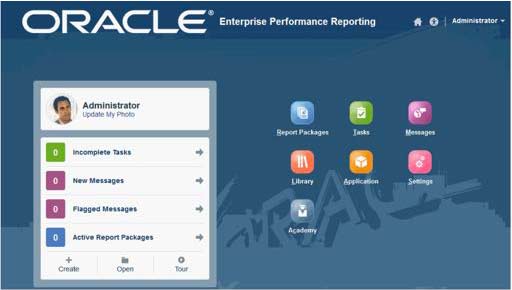 | 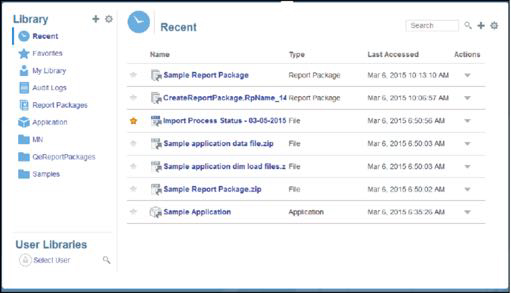 |
Choosing the right tools for EPM dashboards and reporting depends on the audience, reporting frequency, required interactivity, and source systems involved. Some teams need highly formatted financial reports, while others benefit more from dynamic dashboards and self-service analysis.
MindStream Analytics helps organizations design, optimize, and support reporting strategies across Oracle and Hyperion environments. You can also explore our Oracle EPM Cloud services to learn more about planning, reporting, and analytics support.
External research from Gartner also reinforces the value of connected reporting and performance visibility for modern finance teams.